|
Parameter |
Description |
|
Contrast |
The degree of difference between the lightest (white) and darkest (black) parts of an image. Setting a greater value increases contrast. |
|
Hue |
Purity of colors in an image. |
|
Sharpness |
Contrast of boundaries of objects in an image. |
|
Noise Reduction |
Reduce noises in images to improve image quality. |
|
Image Rotation |
•Normal: Displays images without rotation.
•Flip Vertical: Displays images flipped vertically.
•Flip Horizontal: Displays images flipped horizontally.
•180°: Displays images flipped vertically and
horizontally. •90° CW and 90° CCW: Display images in corridor
format. The camera must be installed correctly (rotated 90° clockwise or counterclockwise). |
1. Click the Exposure tab.
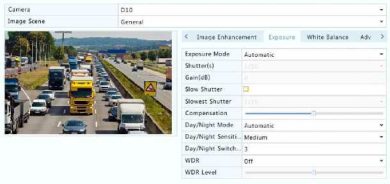
2.Adjust the settings as needed. Some important parameters are described in the table below.