Advertisement
64 min read

2MT-4XXX Series User Guide

M.Salih ASLAN M.Salih ASLAN • • 0 Discussion
2MT-4XXX Series User Guide
AI Powered

AI Content Summary

2MT-4XXX Series User Guide,Digital Video Recorders DVRs are devices which record video to a hard drive. DVRs are used with closed circuit security cameras to create a surveillance system that can detect an record crimes.

Key Moments & Highlights
  • 1
    2MT-4XXX Series User Guide

    Key analytical insights and practical findings are highlighted here.

  • 2
    read next : InVid Tech Devices Password Reset.

    Key analytical insights and practical findings are highlighted here.

Picture 20 392w404h

.

NOTE!

Advertisement
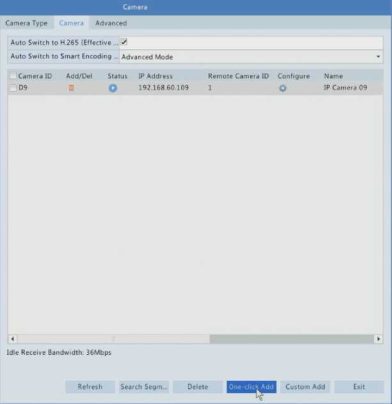
•& under Status means an IP device is added successfully, and you

may click to view live video from the IP device. means the IP device is offline, and you may view the cause by resting the mouse pointer on the .

•The idle bandwidth is displayed to indicate current bandwidth available for receiving streams. For more details, see Network Statistics.
2.(Optional) To search a specified network segment, click Search and then set the address range.
3.Click for the IP device to add. Or, you may also

• Click Custom Add. In the window displayed, enter the IP address and complete other settings, and then click Add. You may also click Search and add discovered cameras in the list.

Option 2

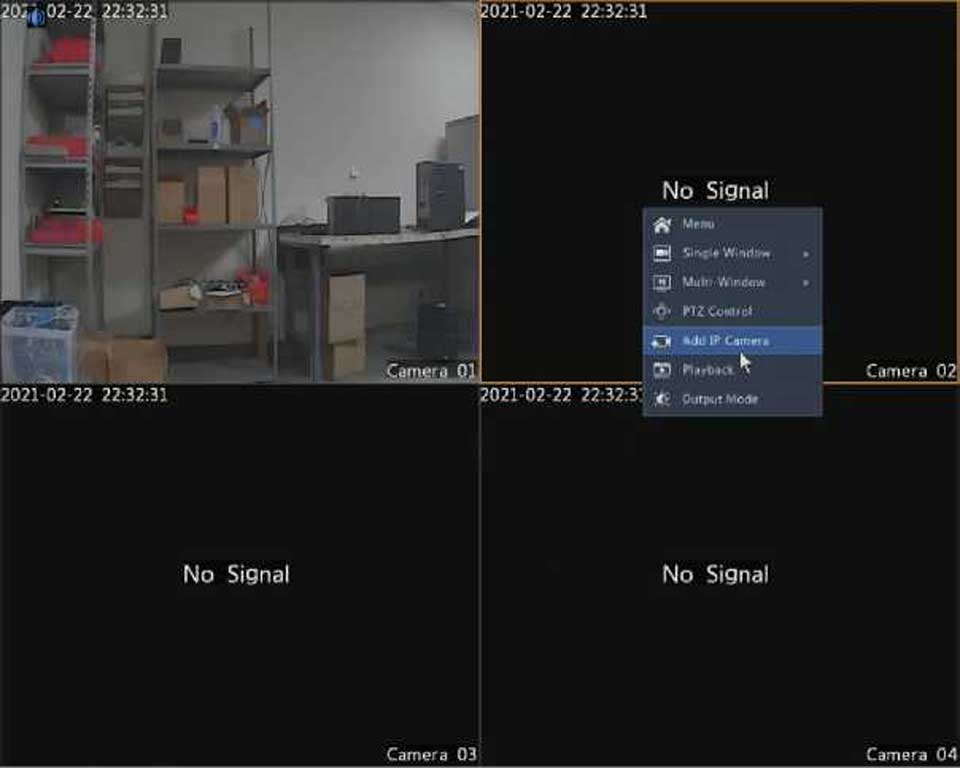
1.Right-click on one of the channels in Live View, click on Add IP Camera.
Picture 21 387w309h

Advertisement
Share this story
M.Salih ASLAN
About the Author

M.Salih ASLAN

Owner and Founder dvraid.com and dvrdestek.com

Leave a Reply

Your email address will not be published. Required fields are marked *

This site uses Akismet to reduce spam. Learn how your comment data is processed.

Pure inspiration, zero spam ✨

Subscribe to our Newsletter

Get the finest stories, perspectives, and trends delivered straight to your inbox.

UP NEXT 98% relevance match
Hikvision How To Tutorials Part 1
Before you go: Hikvision How To Tutorials Part 1