Advertisement
64 min read

2MT-4XXX Series User Guide

M.Salih ASLAN M.Salih ASLAN • • 0 Discussion
2MT-4XXX Series User Guide
AI Powered

AI Content Summary

2MT-4XXX Series User Guide,Digital Video Recorders DVRs are devices which record video to a hard drive. DVRs are used with closed circuit security cameras to create a surveillance system that can detect an record crimes.

Key Moments & Highlights
  • 1
    2MT-4XXX Series User Guide

    Key analytical insights and practical findings are highlighted here.

  • 2
    read next : InVid Tech Devices Password Reset.

    Key analytical insights and practical findings are highlighted here.

Picture 103 387w119h

.

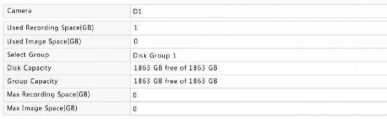
2.Select the desired camera and then set the maximum recording space and maximum image space. For more information, see Advanced Configuration.
3.Click Apply to save the settings.
4.(Optional) Click Copy to apply the same settings to other camera(s).

Advanced Configuration

Advertisement

Set whether to overwrite recordings when storage is full.

1.Click Storage > Advanced.

Picture 104 394w51h

.

.

2. Choose an option.

Option

Allocated Space

Description

Overwrite

0

The camera shares unallocated space, and its oldest recordings will be overwritten when the space is used up.

Other values

The camera’s oldest recordings will be overwritten when its allocated space is used up.

Stop

0

The camera shares unallocated space, and its oldest recordings will still be overwritten when the space is used up.

Other values

The camera’s new recordings will not be saved when its allocated space is used up.

Advertisement
Share this story
M.Salih ASLAN
About the Author

M.Salih ASLAN

Owner and Founder dvraid.com and dvrdestek.com

Leave a Reply

Your email address will not be published. Required fields are marked *

This site uses Akismet to reduce spam. Learn how your comment data is processed.

Pure inspiration, zero spam ✨

Subscribe to our Newsletter

Get the finest stories, perspectives, and trends delivered straight to your inbox.

UP NEXT 98% relevance match
Hikvision How To Tutorials Part 1
Before you go: Hikvision How To Tutorials Part 1