Reklam
64 dk okuma

2MT-4XXX Series User Guide

2MT-4XXX Series User Guide
Yapay Zekâ

Yapay Zekâ İçerik Özeti

2MT-4XXX Series User Guide,Digital Video Recorders DVRs are devices which record video to a hard drive. DVRs are used with closed circuit security cameras to create a surveillance system that can detect an record crimes.

Önemli Satır Başları
  • 1
    2MT-4XXX Series User Guide

    Detaylı analiz ve önemli çıkarımlar bu bölümde yer almaktadır.

  • 2
    read next : InVid Tech Devices Password Reset.

    Detaylı analiz ve önemli çıkarımlar bu bölümde yer almaktadır.

Picture 52 393w156h

.

Alarm Triggered Recording

Reklam

Set input alarms to trigger recording. See Alarm Input and Output for more details.

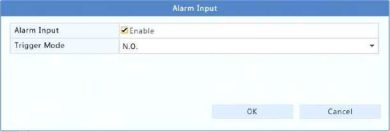
1.Click Alarm > Input/Output > Alarm Input.
2.Set alarm input: click for the desired camera. In the window displayed, select Enable, select N.O. (normally open) or N.C. (normally closed) trigger mode, and then click OK.
Picture 53 390w132h

.

a NOTE!

To apply the same settings to other camera(s), click Copy and then select the desired camera(s).

3.Set alarm triggered recording: clickcunder Trigger Actions. In the window displayed, click the Recording tab, select the desired camera, and then click OK.


Reklam
Bu yazıyı paylaş
M.Salih ASLAN
Yazar Hakkında

M.Salih ASLAN

Owner and Founder dvraid.com and dvrdestek.com

Bir Yorum Yapın

Your email address will not be published. Required fields are marked *

Bu site istenmeyenleri azaltmak için Akismet kullanır. Yorum verilerinizin nasıl işlendiğini öğrenin.

Sadece ilham, sıfır spam ✨

Bültenimize Abone Olun

En iyi hikâyeleri, görüşleri ve son trendleri doğrudan e-postanıza alın.

SIRADAKİ İÇERİK %98 ilgi uyumu
Hikvision How To Tutorials Part 1
Ayrılmadan önce göz atın: Hikvision How To Tutorials Part 1