Advertisement
1 min read

AVTECH CMS Lite User’s Guide

M.Salih ASLAN M.Salih ASLAN • • 4 Discussion
AI Powered

AI Content Summary

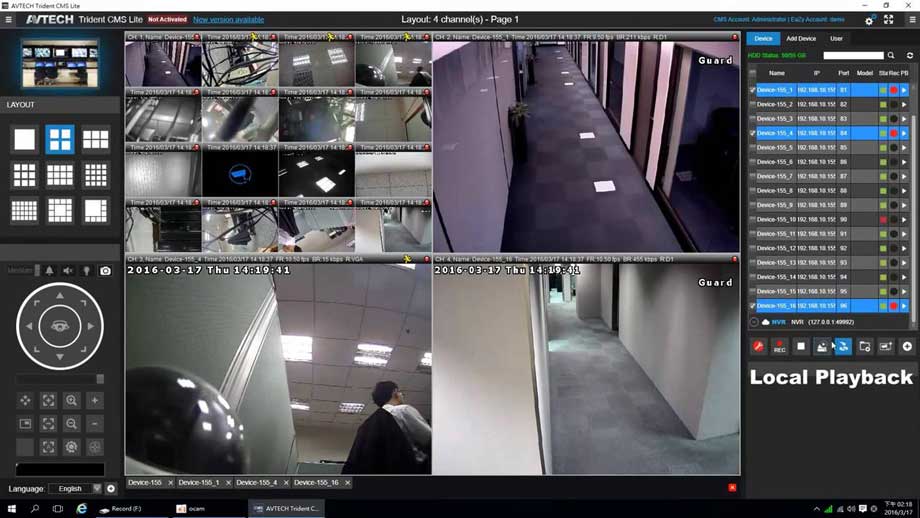
CMS-Lite, the 24CH free software, is exclusively designed for monitoring multiple spots remotely. Common applications are chain stores and branch offices.

Key Moments & Highlights
  • 1
    Strategic Vision & Disruption

    Foundational principles driving emerging methodologies and trends.

  • 2
    Efficiency & Practical Application

    Real-world hurdles explored with actionable optimization techniques.

  • 3
    Looking Ahead: Future Outlook

    What to anticipate in the next phase of development and impact.

CMS-Lite, the 24CH free software, is exclusively designed for monitoring multiple spots remotely. Common applications are chain stores and branch offices. Users can easily use functions such as live view, playback and backup with this software installed on a normal laptop. For advanced central control application, AVTECH provides you with 64CH CMS-Standard and 96CH CMS-Professional. What’s more, there are 16CH EagleEyesHD and 4CH EagleEyes for remote surveillance through tablets and mobile phones.

Solution Software CMS

[wp-embedder-pack width=”100%” height=”800px” download=”all” download-text=”” attachment_id=”685″ /]

Advertisement
Advertisement
Share this story
M.Salih ASLAN
About the Author

M.Salih ASLAN

Owner and Founder dvraid.com and dvrdestek.com

4 Comments

  1. I have a rural need for multiple cameras operating off of one cell phone feed and bill. is that possible? If so, is their a cost per camera involved or a flat fee for let’s say four or five cameras on the same cell phone feed?

Leave a Reply

Your email address will not be published. Required fields are marked *

This site uses Akismet to reduce spam. Learn how your comment data is processed.

Pure inspiration, zero spam ✨

Subscribe to our Newsletter

Get the finest stories, perspectives, and trends delivered straight to your inbox.

UP NEXT 98% relevance match
aevms

XM VMS User Manual

Before you go: XM VMS User Manual