How to Set Intelligent Video Surveillance, Intelligent Video Surveillance (IVS), also known as intelligent video monitoring or intelligent CCTV, represents a significant advancement over traditional surveillance systems.1 It leverages cutting-edge technologies like Artificial Intelligence (AI), machine learning, deep learning, and computer vision to automatically analyze video footage in real-time or from recordings.2
Here’s a breakdown of what makes IVS “intelligent” and how it works:
Key Differences from Traditional Surveillance:
How Intelligent Video Surveillance Works:
Key Features and Applications:
By transforming raw video data into actionable insights, Intelligent Video Surveillance significantly enhances security, safety, and operational efficiency across various sectors.30
How to Set Intelligent Video Surveillance Function (WEB 5.0)
Any model and firmware with IVS supported. (This tutorial is based on WEB 5.0 firmware)
Interface may vary on some models and firmware.
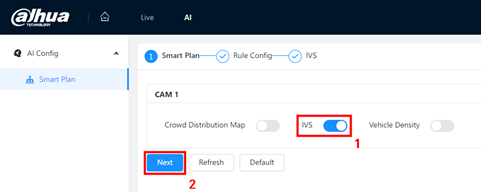
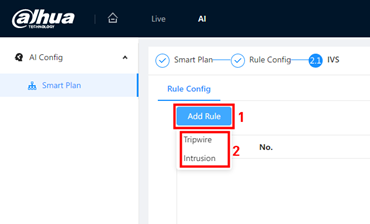
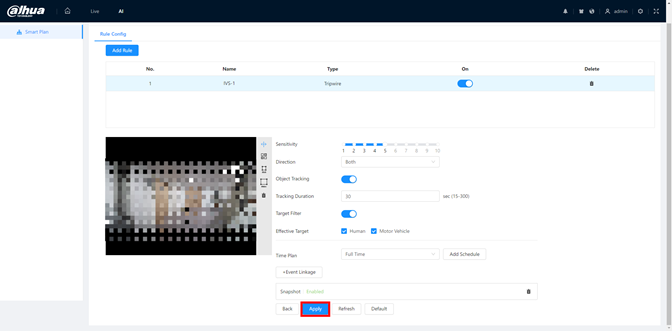
Click rule name can modify it. Click the icon can delete this rule.
Use left click on the image to draw the rule, right click to end the drawing.
Regional rules will auto close into a region when finished drawing.
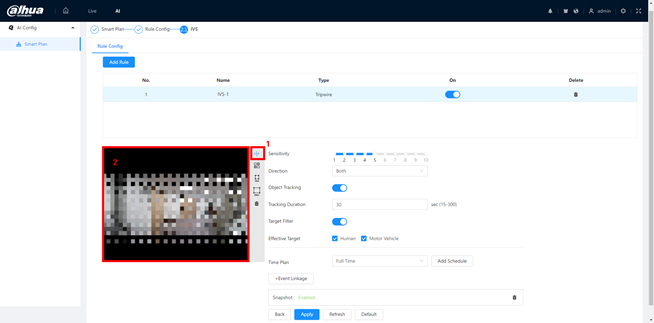
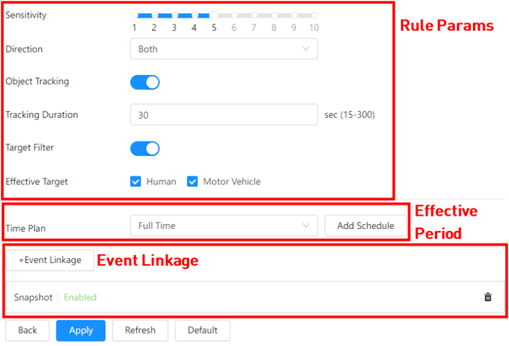
Rule Params: You can set the rule effect period, detection direction, sensitivity and enable special target filter. Different rule type may have different rule params.
Effective Period: You can select Effective object, Human or Motor Vehicle. For example, when you select Human as the alarm target, an alarm will be triggered when the system detects that persons trigger the rule.
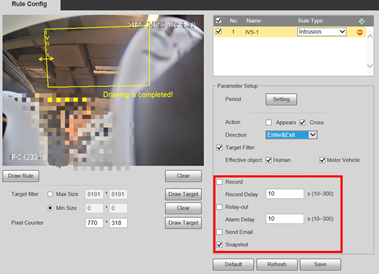
Event Linkage: You can select what operation will be done when event triggered.
.
How to set Intelligent Video Surveillance (Web 3.0)
Any model and firmware with Intelligent Video Surveillance supported. (This tutorial is based on WEB 3.0 firmware)
Interface may vary on some models and firmware.
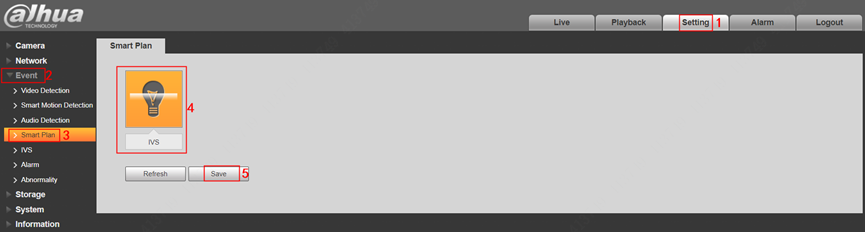
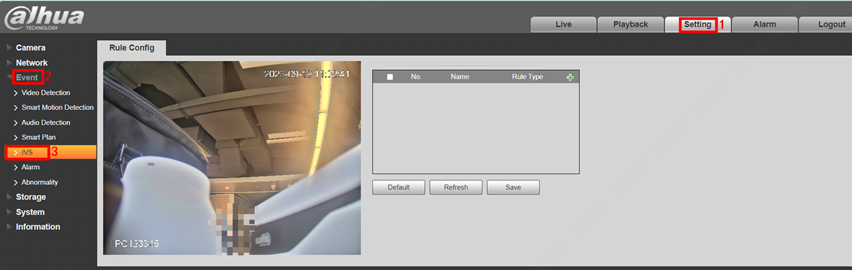
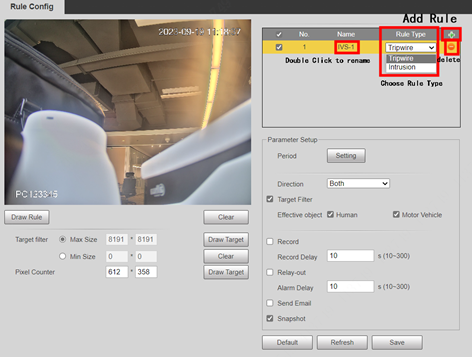
Double-click the Name to modify rule name, and select the Rule Type you want, also you can click to delete it.
Function 1: Tripwire
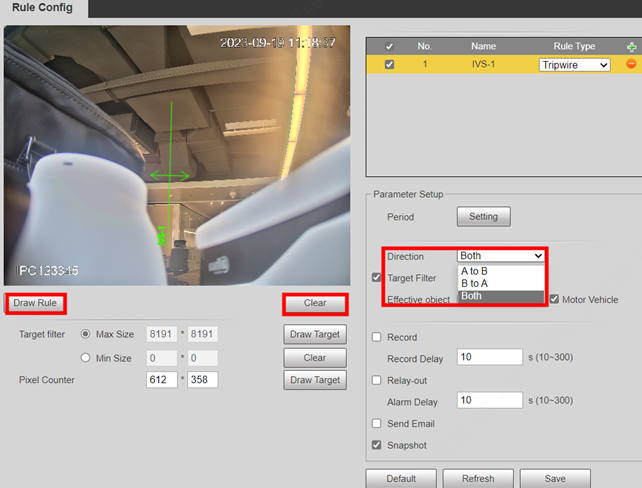
And you can click Clear to delete all drawn lines.
Function 2: Tripwire
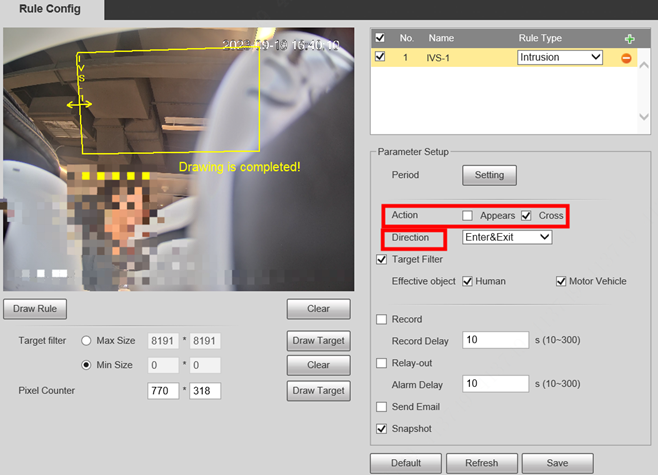
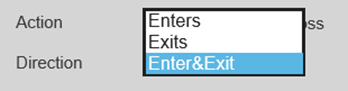
And you can click Clear to delete all drawn lines.
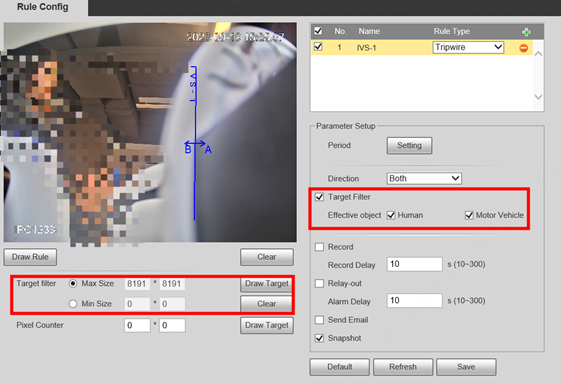
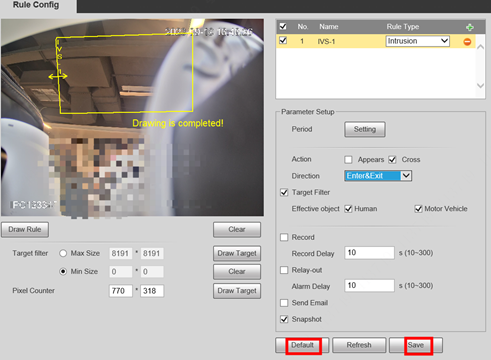
You can select Effective object, Human or Motor Vehicle. For example, when you select Human as the alarm target, an alarm will be triggered when the system detects that persons trigger the rule.
Click Draw Target to draw the minimum gathering area in the scene. The alarm will be triggered when the number of people in the detection area exceeds the minimum area. When the rule of crowd gathering is configured, you do not need to set target filter, but draw the minimum gathering area.
Click Clear to delete all drawn detection lines.
Click Draw Target at the right side of Pixel Counter, and then press and hold the left mouse button to draw a rectangle, the Pixel Counter then displays its pixel.
Construction Instruction Maanual_DH Network Camera_Installation Manual(AI Fisheye)
.
Scenario Requirements
Specific requirements:
Installation Requirements
For ceiling mount mode, see the following installation requirements:
1. There is sufficient light in the scenario to ensure illumination effect.
2. Avoid a complex scenario with frequently changing light, backlight, and direct light exposure.
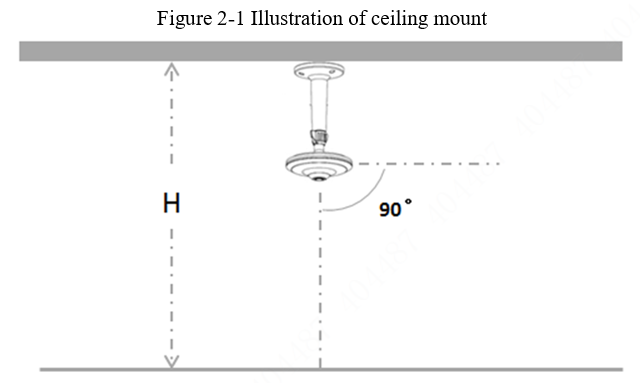
3.mountMake the camera face the monitoring center region, so that the intelligent detection will be more accurate. See Figure 2-1.
4. The recommended installation height (H) is 3–4 m. Exceeding this range will affect the accuracy
Installation
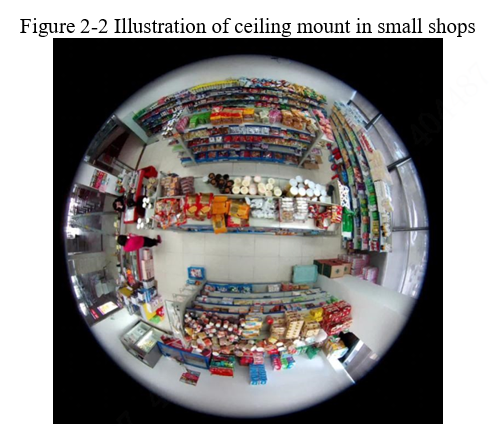
The surveillance image of fisheye products is an original circle and is wider. You need to use multiple devices to monitor a scenario, but one fisheye camera can do this. Use this advantage during installation. In view of the advantages, the ceiling mount is preferred for indoor installation. See Figure 2-2, the small shop is equipped with a ceiling mounted fisheye camera
.
Generally, the indoor floor is 3-4 m away from the ceiling and this height is proper for the economical fisheye cameras. Install the cameras in the middle of the monitored places, thus making the monitored places in the middle of the fisheye cameras, and obtaining most effective images. The project indoor products can be installed higher (6-8 m).
Wall mount is needed based on different customer requirements or scenarios. The height selection is vital to wall mount. The mount height might vary according to main surveillance scenarios. If too high, the ceiling is included in the image. See Figure 3-3, the indoor fisheye camera is mounted too high, leading to less effective images.
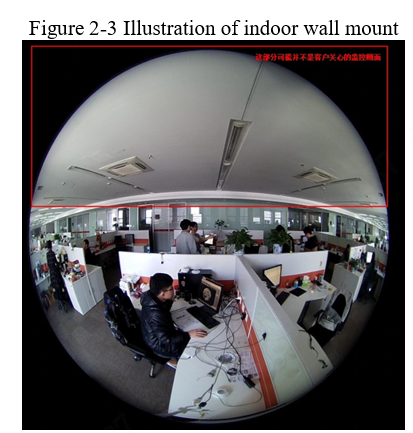
Therefore, for indoor wall mount, the camera should not be installed too high. Generally, 2-3 m is preferred.
.
Indoor Environment
It is necessary to select proper indoor fisheye products and well install them. The indoor products are not subject to waterproof or explosion proof requirements. Therefore, refer to this for model selection.
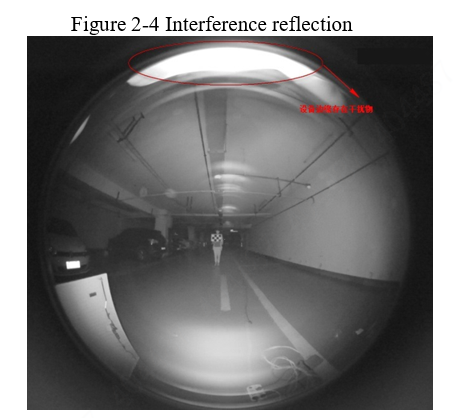
IR devices are less dependent on the environment, so they can perform surveillance efficiently in the dark. In addition, install IR devices against interference from other objects. The fisheye lens enjoys a wide field, so IR reflection will largely affect the image effect. See Figure 2-4, IR reflection occurs when a hand touches the front cover surface during the image shooting test, resulting in abnormal images.
Outdoor Environment
In the outdoor environment, ceiling and wall mount are preferred, not ground mount.
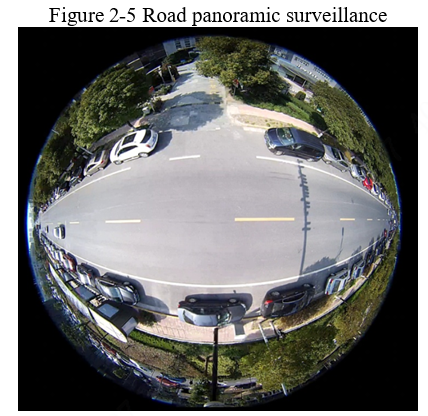
The ceiling mount is generally 6-8 m. For example, the camera installed at the height of 8 m has a wider view than that installed at the height of 6 m. For road panoramic surveillance, see Figure 2-5.
.
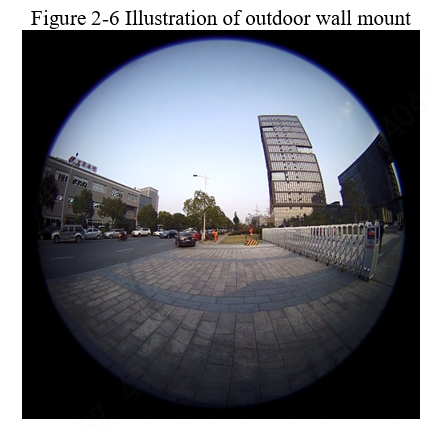
Unlike indoor, the outdoor wall mount depends more on the mount bracket than the height. The figure below shows the outdoor wall mount scenarios – monitored gateway and roads.
Arming Data
For fisheye products, the closer to the edge, the greater the distortion of the image, thus the intelligent detection rate of the region close to the image edges reduces. To ensure the effect of intelligent detection, pay attention to the following points when enabling the function:
1. There is sufficient light in the detection image without obstacles.
2. The detected person must be fully exposed (such as the shoulder width).
3. It is recommended that the detection region is within 80% of the image center.
4. The lens surface is free of obstruction, dirt, and other factors that affect the image.
.
Table2-1 Reference data for EW5541/EB5541 fisheye arming
| Product Model | Focal Length (mm) | Recommended Installation Height Range (m) | Person Height (m) | Installation Height (m) | Surveillance Radius (m) |
|---|---|---|---|---|---|
| DH-IPC-EW5541 Series DH-IPC-EB5541 Series | 1.4 | 3<H<4 | 1.7 | 2.5 | 4.3 |
| 1.7 | 3 | 4.2 | |||
| 1.7 | 3.5 | 4 | |||
| 1.7 | 4 | 3.7 | |||
| 1.7 | 4.5 | 3.4 |
.
Table2-12Reference data for EBW81242 arming
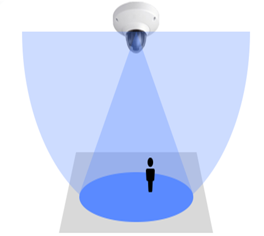
Note: Surveillance radius is the effective detection width corresponding to the central axle of the camera. Do not mistake it for the detection width of the farthest end or nearest end of the camera.
Table 2-2 Arming reference data for EBW81242, EBW81242-AS-S2, and EBW8842-AS
| Installation Height (m) | Intelligent Function | Inspection Region Radius (m) |
| 3 | People counting | 5 |
| Queuing time | 4 | |
| 3.5 | People counting | 5 |
| Queuing time | 4 | |
| 4 | People counting | 5 |
| Queuing time | 3.5 |
Table 2-3 Arming reference data for EBW81242-AS-IVC and EBW8842-AS-IVC
| Installation Height (m) | Intelligent Function | Inspection Region Radius (m) |
| 3 | People counting | 4.5 |
| Queuing time | 3.5 | |
| 3.5 | People counting | 4.5 |
| Queuing time | 3.5 | |
| 4 | People counting | 4 |
| Queuing time | 3 |