

How to reset the password or get the recovery code of your DVR/NVR
To know how to get the password of your reset the password DVR / NVR, please see the model of your unit below and select the relevant guide to get the recovery code. For example, the SKU number SODVK-856808RLBUD has the DVR-5680 model number. (See where to get the model number?)
Recover your Swann Security DVR, NVR, or NVW “Admin” password using the Swann Security app
NOTE1: This guide is for the following recorders : DVR – 4480G, 4480RN, 4480V, 4580G, 4580RN, 4580V, 4680, 4680RN, 4680A, 4685, 4685RN, 4780V, 4980, 5580, 5580A, 5580G, 5580G2, 5580RN, 5580RU, 5680, 5680A, 5680RN, NVR – 8580, 8580RN, 8780, 8780RN, NVW-650, NVW-800
NOTE1: This guide is for users who no longer remember their Swann DVR, NVR, or NVW “Admin” or system login password, but can still remotely access the system via the Swann Security app.
Make sure to use the latest version of the Swann Security app. Check the App store or Play Store on your phone for the latest Swann Security app.
Click below to download the guide on finding your DVR, NVR, or NVW “Admin” or system password via the Swann Security app
- ENGLISH – Finding the CCTV Password via Swann Security app
- ESPAÑOL – Encontrar su contraseña DVR/NVR a través de la aplicación Swann Security
NOTE2: If you are no longer able to remotely access the system via the Swann Security app, you may have to reset the password of your Swann DVR or NVR system.
For more information on resetting your DVR or NVR password, please see the following articles below:
Swann Security Password Reset
NOTE: This guide is for the following recorders : DVR-4480G, 4480RN, 4480V, 4580G, 4580RN, 4580V, 4680, 4680RN, 4680A, 4685, 4685RN, 4780V, 4980, 5580, 5580A, 5580G, 5580G2, 5580RN, 5580RU, 5680, 5680A, 5680RN, NVR-8580, 8580RN, 8780, 8780RN, NVW-650, 800
NOTE2: If you are trying to reset the password for your Swann Security account, please proceed to this article instead: Password Reset for Swann Security Account
This guide is intended for customers to reset their Swann recorder when they have forgotten their password using the Swann Security VMS PC software.
Acquiring the reset code
The reset code on new recorders is acquired primarily by using the relevant client software on a computer. Other methods exist, but they usually require a level of networking knowledge over what we expect customers need to operate their system.
The reset code itself is a unique 12 character string that is generated by the unique hardware identifier of the network interface of the device, known as the MAC address.
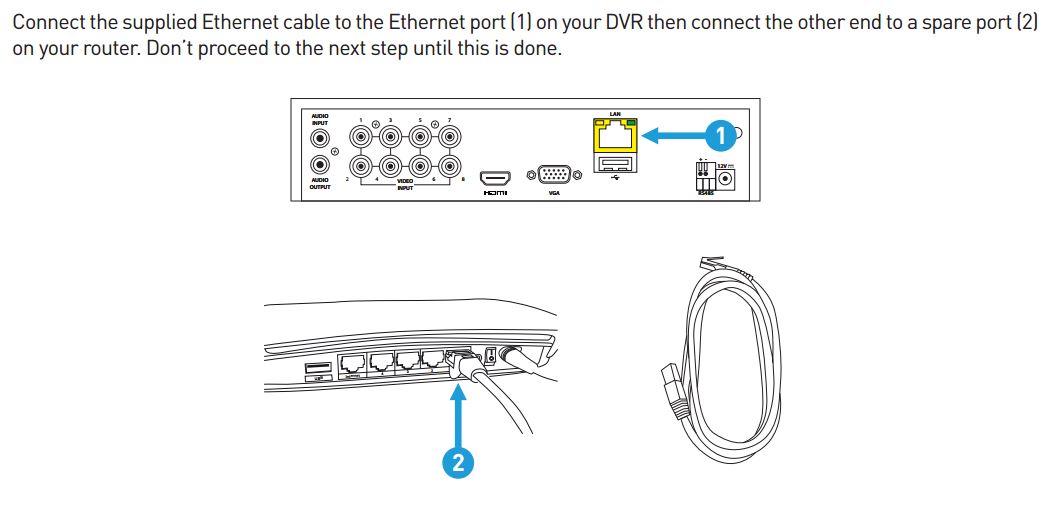
Excerpt from the Hardware Quick Set Up Guide
NOTE: NVW units doesn’t need to be hardwired to obtain the MAC Address
To find your recorder’s reset code, connect the recorder to your router (if you have not yet done so) and install and run the software on your computer connected to the same router.
Installing the software
Download the software
Download the Swann Security VMS software on your Windows computer and install it.
If this prompt appears, click More Info then Run Anyway then continue with the installation.
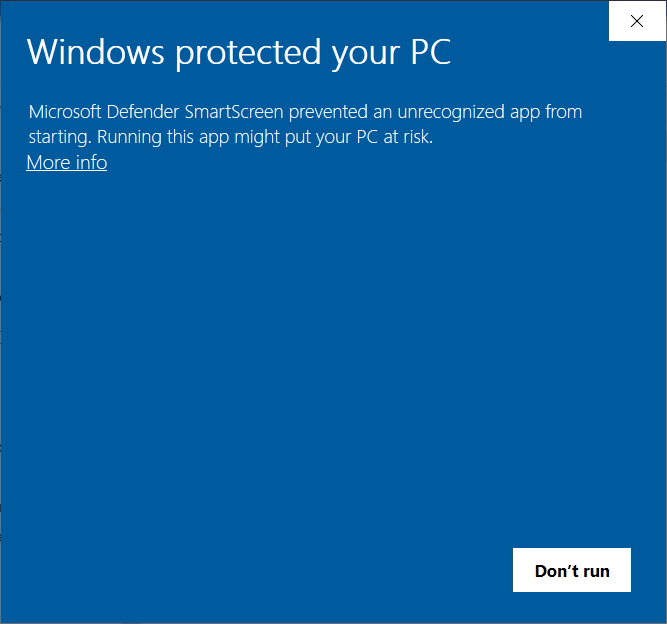
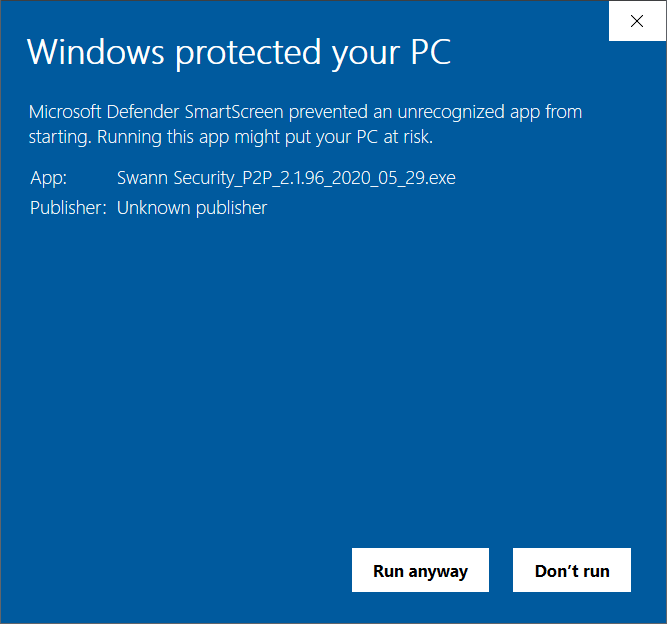
Once installed, open the Swann Security program and follow the steps below:
- Set a password – to protect you from anyone who wants to view your unit on your computer.
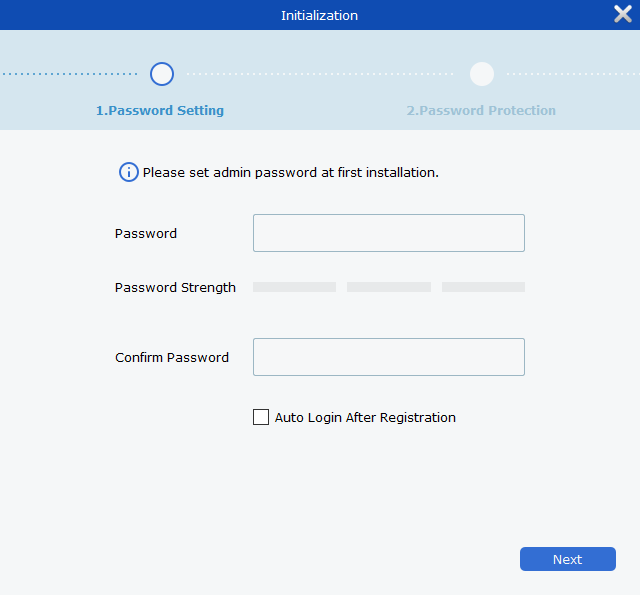
- Set a security question – will be used when you forgot the password your set.
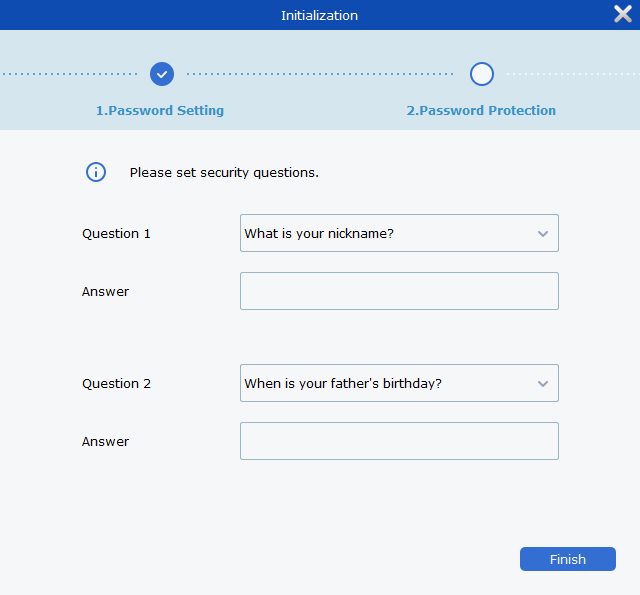
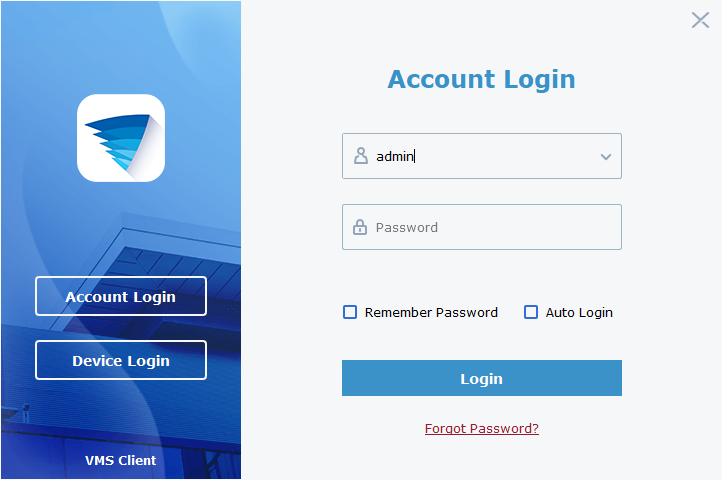
- Login – just type in the password you’ve set earlier. Username is admin.
- Search for device
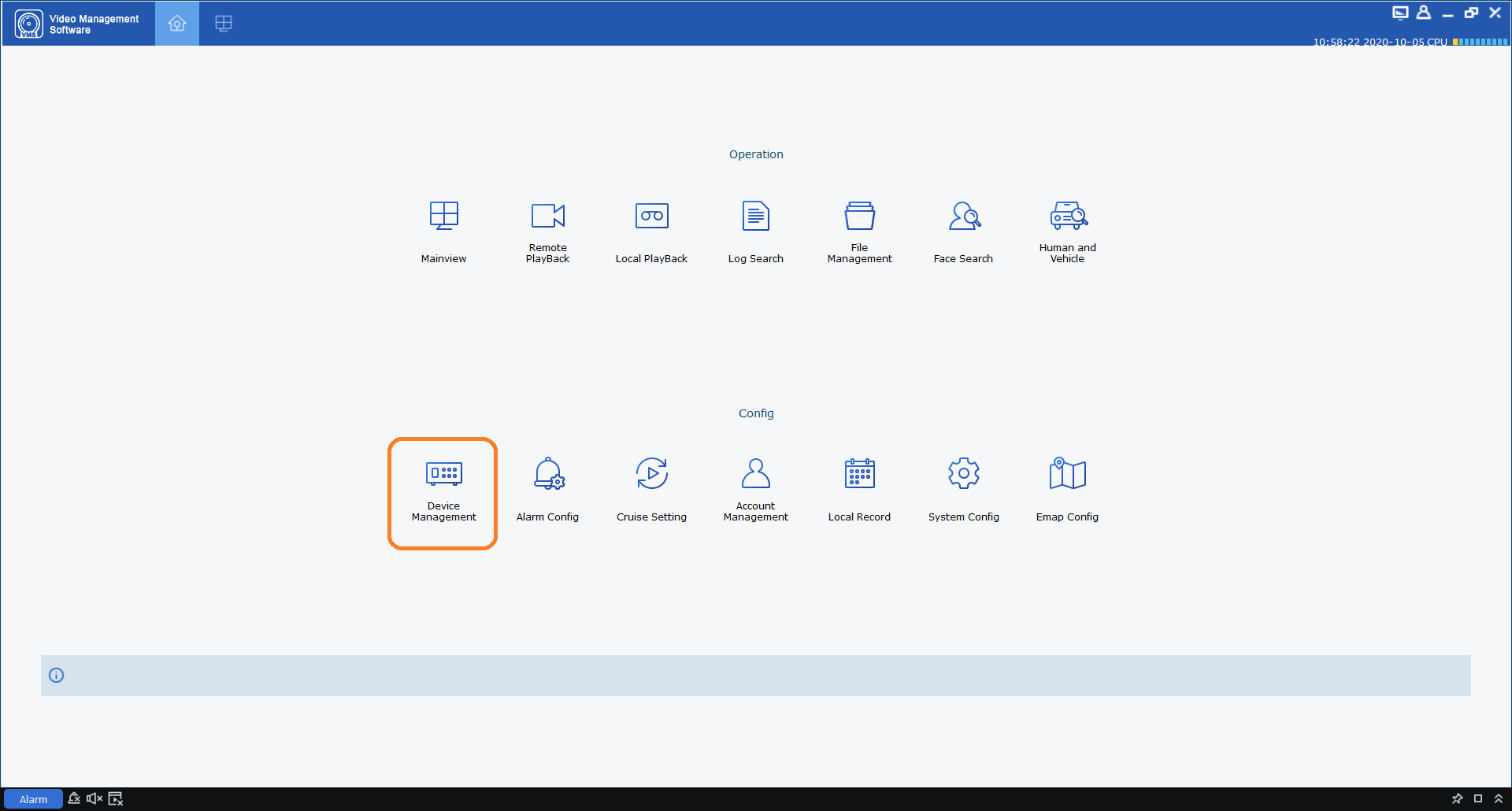
- Click the Home icon (top-left) then choose Device Management
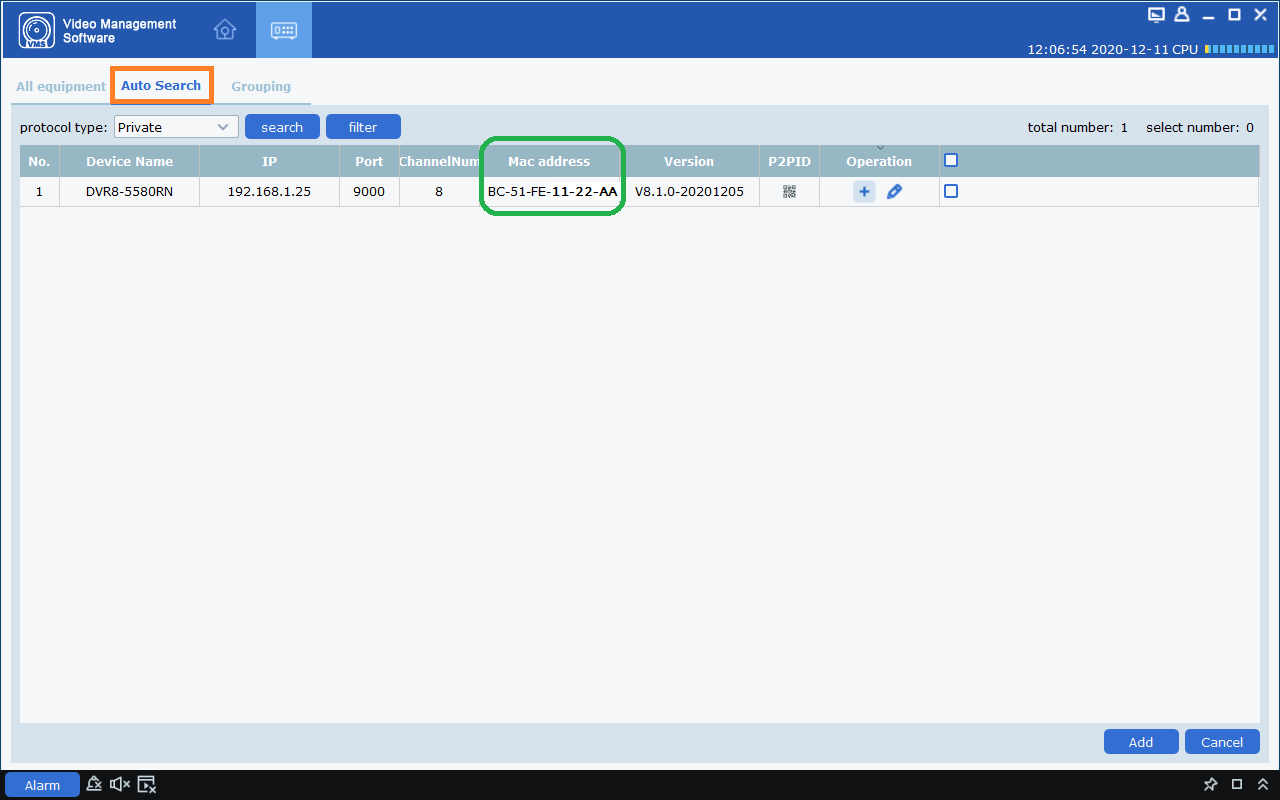
- Click the Auto Search (top) to get the MAC address of your recorder. Copy down any MAC address starting with the characters ’00-23-63′ or ‘BC-51-FE’ first, then any others. Replace the dashes (-) with colons (:).
- Click the Home icon (top-left) then choose Device Management
Entering the reset code
You now use what you wrote down in the previous step to initiate a password reset on the recorder. On the Login interface, click Forgot Password.
On the recorder:

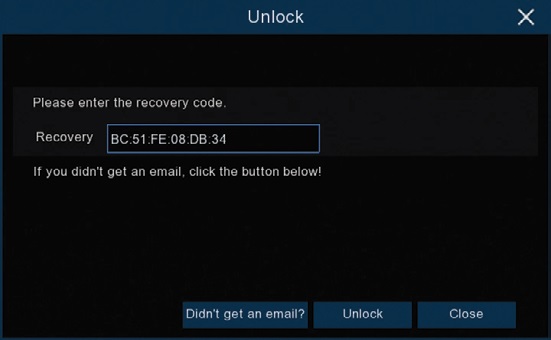
The reset code needs to be entered after clicking Forgot Password. Enter it in the Recovery field. Letters are in UPPERCASE with the colons (e.g BC:51:FE:11:22:33).
Click Unlock once done. A message will appear on-screen stating that your password has been reset. Click OK to continue.
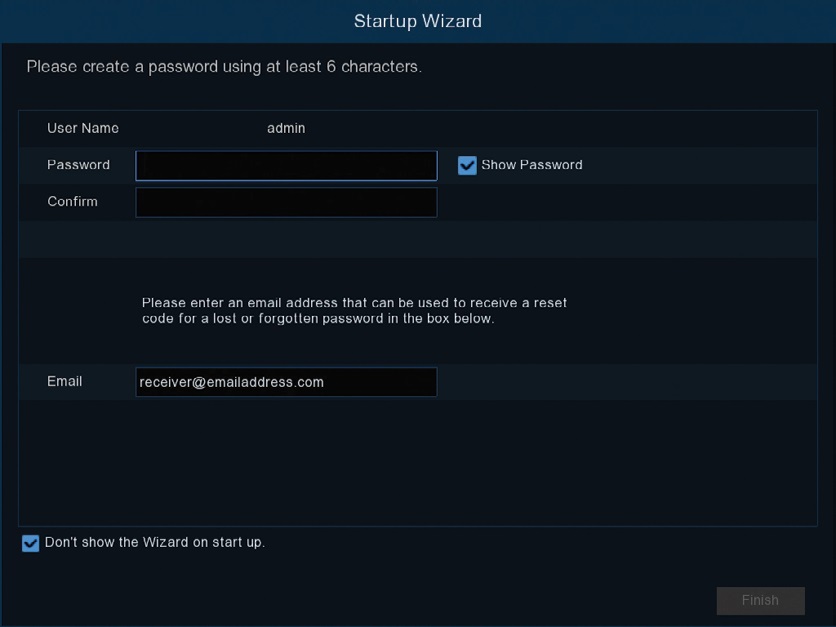
Once this window appears, enter your preferred password (minimum of 6 characters).
You must enter an email address below so the next time you need to reset your password, the MAC address will be sent to your email; otherwise, you can write down your MAC address somewhere safe.
Click FINISH once done.
Notes
You will need to re-enter a new password every time you reset the password. The reset code CANNOT be used to login to the recorder nor can it be used for remote access.
Swann Security VMX Password Reset (Windows)
NOTE: This guide is for the following recorders : DVRx-4680X, 4680XN, 5680X, 5680XN
NOTE: If you are trying to reset the password for your Swann Security account, please proceed to this article instead: Password Reset for Swann Security Account
This guide is intended for customers to reset their Swann recorder when they have forgotten their password.
Acquiring the password
If your recorder hasn’t been paired yet, proceed HERE.
When you pair your OS 5X recorder to your account via Swann Security app, you can get its password under recorder’s settings.
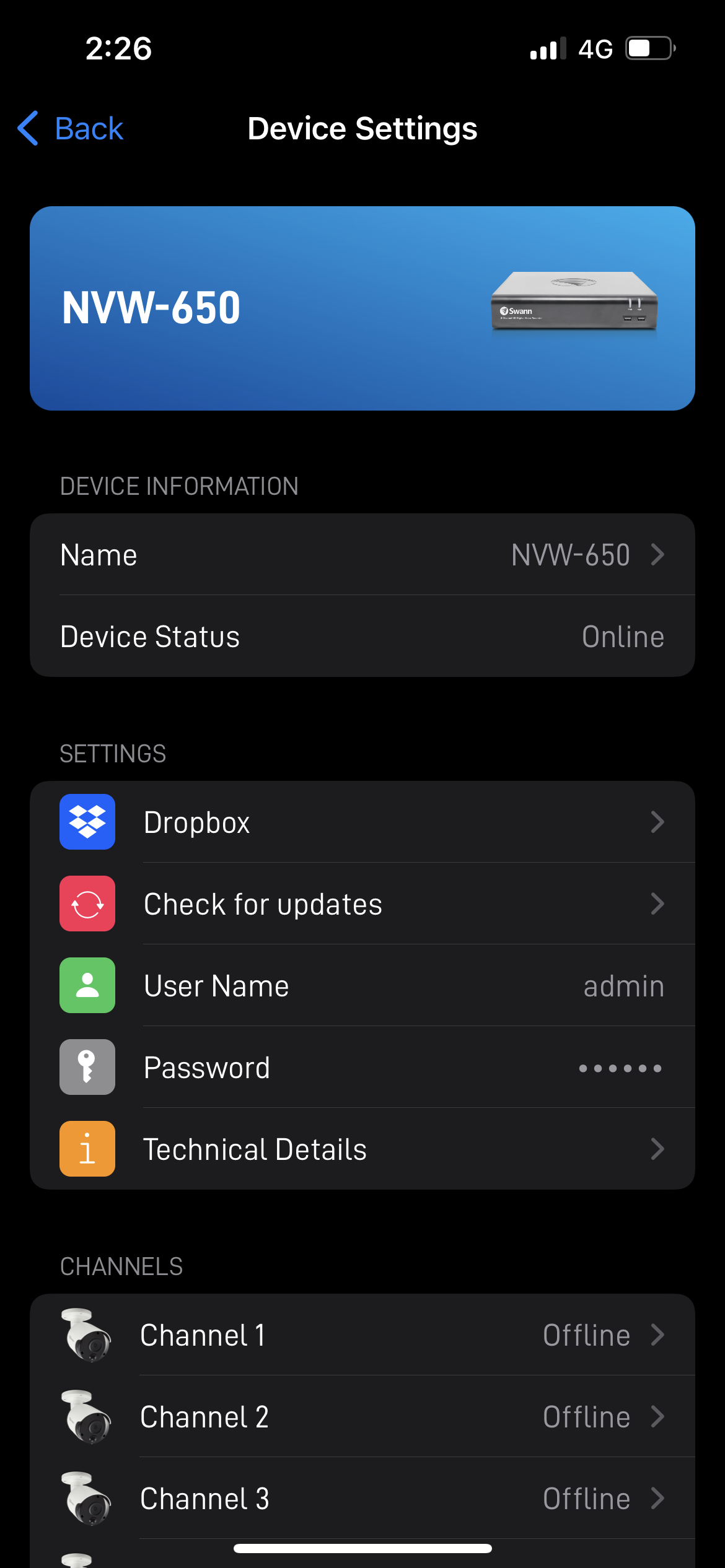
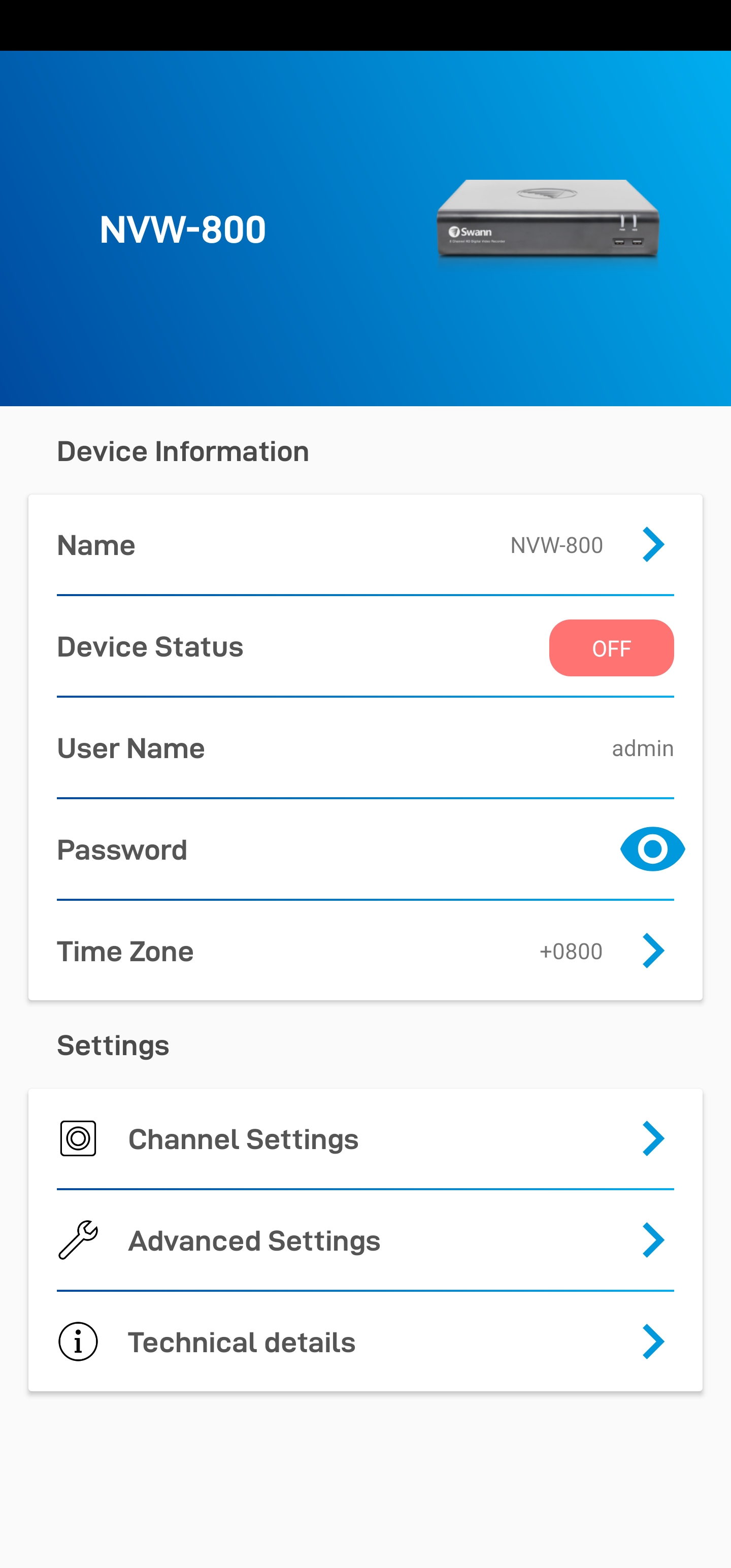
Simply go to Device Settings > choose your recorder. From here, you will then see the User name and Password. Tap the password to unhide it.
| iOS | Android |
 |
 |
Acquiring the reset code
The reset code on new recorders is acquired primarily by using the relevant client software on a computer. Other methods exist, but they usually require a level of networking knowledge over what we expect customers need to operate their system.
The reset code itself is a unique 12 character string that is generated by the unique hardware identifier of the network interface of the device, known as the MAC address.
The simplest way is to scan the QR code on top and get the MAC address starting with BC51FE. Some phones have a built-in QR code scanner in their camera app but if none, you may need to download a 3rd party app like Google Lens in this example.
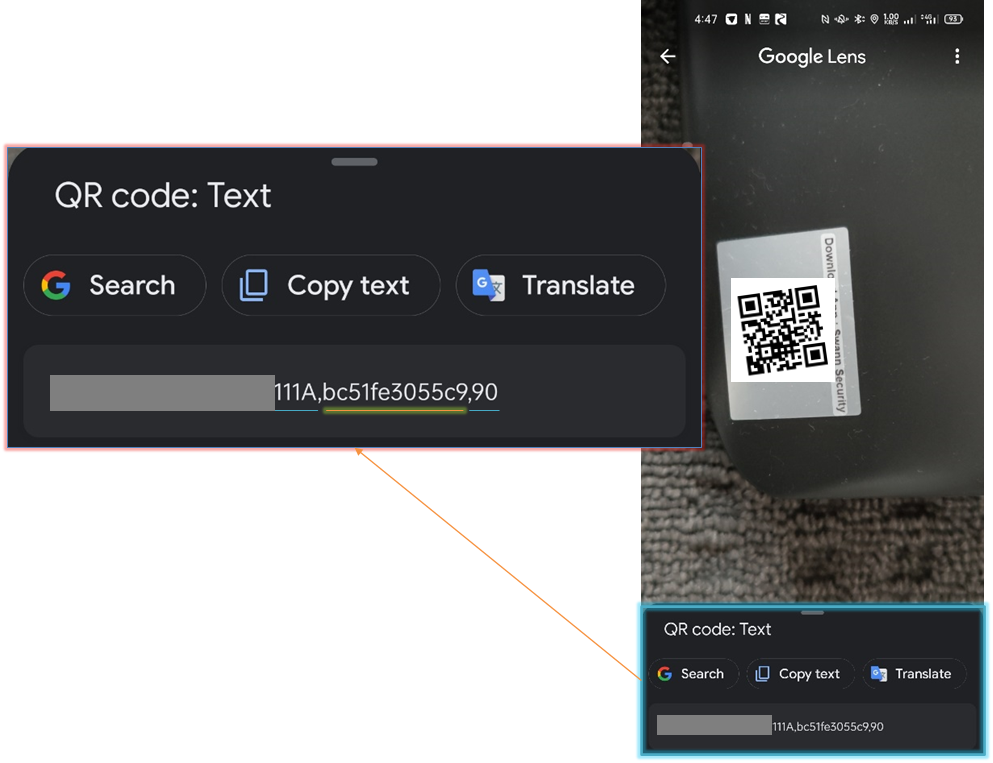
Once you have it, you can skip the rest of the step below and proceed HERE; otherwise, continue below.

Excerpt from the Hardware Quick Set Up Guide
To find your recorder’s reset code, connect the recorder to your router (if you have not yet done so) and install and run the software on your computer connected to the same router.
Installing the software
Download the software
Download Swann Security VMX software on your Windows computer and install it.
Once installed, open the Swann Security VMX program and follow the steps below:
- Login – default username and password is admin & admin then click Sign in

- Add device – choose Add devices manually then click OK

- Search device – click IPV4 Search and copy the MAC address that will show above

Entering the reset code
You now use what you wrote down in the previous step to initiate a password reset on the recorder. On the Login interface, click Forgot Password.
On the recorder:

The reset code needs to be entered after clicking Forgot Password. Enter it in the Recovery field. Letters are in UPPERCASE with the colons (e.g BC:51:FE:11:22:33).
Click Unlock once done. A message will appear on-screen stating that your password has been reset. Click OK to continue.

Once this window appears, enter your preferred password (minimum of 6 characters).
You must enter an email address below so the next time you need to reset your password, the MAC address will be sent to your email; otherwise, you can write down your MAC address somewhere safe.
Click FINISH once done.

Notes
You will need to re-enter a new password every time you reset the password. The reset code CANNOT be used to login to the recorder nor can it be used for remote access.
SwannView Link Password Reset
NOTE: This guide is for the following recorders : DVR-1000 (16ch), 1250, 1260, 1425, 1450, 1580, 2555, 2900, 3000, 3200, 3250, 3260, 3425, 3450, 4000, 4100, 4150, 4200, 4400, 4550, 4600, 4750, 5000, HDR6-8000, HDR6-8100, HDR4-8200, NVR-7072, 7082, 7085, 7285, 7300, 7400
This guide is intended for customers to reset their Swann recorder when they have forgotten their password. This guide is for the model series 1580 rev.1*, 4550 rev.1*, 4750, 7300 & 7400 which is up to date. If your recorder is not up to date, this method may not work and you will need to call Swann Tech Support and request assistance from an agent.
Acquiring the reset code
The reset code on new recorders is acquired primarily by using the relevant client software on a Windows PC or Mac computers. Other methods exist, but they usually require a level of networking knowledge over what we expect customers need to operate their system.
The reset code itself is a unique 12 character string that is generated by the unique hardware identifier of the network interface of the device, known as the MAC address.

Excerpt from the Hardware Quick Set Up Guide
To find your recorder’s reset code, connect the recorder to your router (if you have not yet done so) and install and run the software on your computer.
Installing the software
Download the software
The first step is to download the necessary software to your PC. A link to the software is below.
- SwannView Link for Windows
- SwannView Link for Mac
(NOTE: If you are using Mac OS Catalina, go to this article instead: How to get the MAC address of a recorder using a Mac computer?)
Using the software
The first time you run SwannView Link, you will see this screen.

The software opens to the main page with various information displayed. Click on Add Device. You should see this below:

For Windows

For Mac
Copy down any MAC address starting with the characters ‘EC71DB’ first, then any others. Ignore the colons as they are not necessary.
Entering the reset code
You now use what you wrote down in the previous step to initiate a password reset on the recorder. On the System Login, click Forgot Password.
On the recorder:

The reset code needs to be entered after clicking Forgot Password. Enter it in the Super Password field. Letters are in UPPERCASE without the colons (e.g EC71DB5C4AF5).

If the window you see looks similar to the image below, you are in the wizard. The reset code CANNOT be entered in this area. Make sure to setup your new password and click NEXT. You can cancel the rest of the Setup Wizard if you want.

Cancel the wizard then open the right-click menu and select Main Menu (home button) to access the login window.
Once you enter in the “admin” username and reset code, the recorder will reboot. That indicates that the reset is successful and you will be presented with the window to enter a starting password after the recorder has finished rebooting.
Notes
You will need to re-enter a new password every time you reset the password. The reset code CANNOT be used to login to the recorder nor can it be used for remote access.
How to reset the password of a Swann Security DVR or NVR using the Homesafe Config Tool
NOTE: This guide is for the following recorders : DVR – 4480G, 4480RN, 4480V, 4580G, 4580RN, 4580V, 4680, 4680RN, 4680A, 4685, 4685RN, 4780V, 4980, 5580, 5580A, 5580G, 5580G2, 5580RN, 5580RU, 5680, 5680A, 5680RN, NVR – 8580, 8580RN, 8780, 8780RN, NVW-650, NVW-800
This guide is intended for customers to reset the password of their Swann Security DVR or NVR when they have forgotten their password.
If you already have the Swann Security (Windows)PC software installed, go to this article HERE.
Start by downloading the Homesafe Config Tool software (Windows only) from the link below.
HomeSafe Config Tool (Windows)
Locate the HomeSafe Config Tool installer file in the computer and run it by double-clicking it. In some instances, you may have to run the program as an administrator. Right-click on the HomeSafe Config Tool installer file and select Run as administrator.
Follow the prompts to install the HomeSafe Config Tool until you hit Finish.
Next, locate the HomeSafe Config Tool icon on the desktop. Open or right-click on the icon and select Run as administrator.
Hit the Search button on the top left side and the tool will search your Swann system over the local network. Once found, note down the MAC address of the system. In this example, the MAC address of this system is BC-51-FE-AA-4C-24.
Next, go to your Swann DVR and open the login screen. Then, click the Forgot Password button.
Type the MAC address of your Swann system in the Recovery code field. In this example, type BC:51:FE:AA:4C:24 with the colon symbol. Hit the Enter button, then the Unlock button.
You have now successfully reset the password of your Swann Security DVR/NVR system. Hit the OK button to create a new password.
HomeSafe Config Tool Password Reset (Windows)
For Recorder Models: DVRx-1590, 1600, 4480, 4480G, 4480V, 4575, 4580G, 4580V, 4680, 4680A, 4685, 4780, 4780V, 4980, 4980V, 5580, 5580G, 5680, 5680RN or NVR-7450, 8580, 8780
Before you start, please ensure that the following criteria are met:
- Your recorder is connected to the modem/router.
- A monitor and mouse must be connected to the recorder.
- A Windows computer/laptop connected to the same network as the recorder.
Once you have everything in place, please follow the instructions below.
Getting the reset code
- Download and install HomeSafe Config Tool
- Open the software and you should see your device on the list. If not, click on Search.

- Take note of the MAC address. If you can’t see it, scroll to the right.

Resetting the password
- Get to the login screen on the recorder.
- Click on Forgot Password.
- Enter the MAC address that you took and replace ” – ” with ” : “. It should look like this – BC:51:FE:11:22:33

- Click on OK once done.
- You then need to set your new password. Please follow your Wizard Quick Start Guide.
HomeSafe View Password Reset
NOTE: This guide is for the following recorders : DVR-1590, 1600, 4575/4580/4590, 4780, 4980, NVR-7450
This guide is intended for customers to reset their Swann recorder when they have forgotten their password.
Acquiring the reset code
The reset code on new recorders is acquired primarily by using the relevant client software on a Windows PC or Mac computers. Other methods exist, but they usually require a level of networking knowledge over what we expect customers need to operate their system.
The reset code itself is a unique 12 character string that is generated by the unique hardware identifier of the network interface of the device, known as the MAC address.

Excerpt from the Hardware Quick Set Up Guide
To find your recorder’s reset code, connect the recorder to your router (if you have not yet done so) and install and run the software on your computer.
Installing the software
Download the software
If you are using a Windows computer and haven’t installed HomeSafe View yet, follow this article instead:
Swann Security Password Reset (Windows)
Otherwise, if you are using a Mac computer, install the software linked below:
Once you have HomeSafe View software open, proceed below
Using the software
The first time you run HomeSafe View, you will see this screen.

Click on Next. A new window will show up. Click on Add online device located at the upper left.

Once your DVR shows on the list, click it once to see the MAC Address at the right side.

Copy down any MAC address starting with the characters ’00-23-63′ or ‘BC-51-FE’ first, then any others. Replace the dashes (-) with colons (:).
Entering the reset code
You now use what you wrote down in the previous step to initiate a password reset on the recorder. On the Login interface, click Forgot Password.
On the recorder:


The reset code needs to be entered after clicking Forgot Password. Enter it in the Super Password field. Letters are in UPPERCASE with the colons (e.g BC:51:FE:11:22:33).


If the window you see looks similar to the image below, you are in the wizard. The reset code CANNOT be entered in this area. Make sure to setup your new password and click NEXT. You can cancel the rest of the Setup Wizard if you want.

Cancel the wizard then open the right-click menu and select Main Menu (home button) to access the login window.
Once you enter in the “admin” username and reset code, the recorder will reboot. That indicates that the reset is successful and you will be presented with the window to enter a starting password after the recorder has finished rebooting.
Notes
You will need to re-enter a new password every time you reset the password. The reset code CANNOT be used to login to the recorder nor can it be used for remote access.
DVRx-1500/1525/1550/1575/4350/4500/8050/8075 Password Reset via generate code
This guide is intended for customers to reset their Swann recorder when they have forgotten their password. This guide is for the model series 4350, 4500, 8050 & 8075 which could be not yet up to date. If this method didn’t work for you, try checking the article below:
SADP Tool Password Reset (Windows)
Acquiring the reset code
The reset code on older recorders is acquired primarily by using the relevant client software on a Windows PC.
The reset code itself can be acquired from our Technical Support. Further information will be indicated on the succeeding steps.
Excerpt from the Hardware Quick Set Up GuideTo generate your recorder’s reset code, connect the recorder to your router (if you have not yet done so) and install and run the software on your computer.
Please check this article and follow the instruction carefully:
Installing SADP Tool
Using the software
The software opens to the main page with various information displayed. You should see at least one entry here if your recorder is correctly connected to the network. Select your recorder by clicking the checkbox at the left to fill the information needed at the right.
Copy the Device Serial No. and send an email to tech@swann.com to get the generated code.
While waiting for the code, you can try the other method and see if this works for you, check the article below:
SADP Tool Password Reset (Windows)

Entering the reset code
Once we get the details. We will email you back with 3 different codes (case sensitive). Each code was created depending on the current date of your DVR live view. (The date showing on the live view on the monitor).
Once you receive the 3 codes. Please click on Forgot Password located at the lower right.
A window will pop up called Restore Default Password.
Type a generated code on the Security Code text box. Please keep in mind that it is case sensitive.
If the window you see doesn’t look similar to this, then you can skip the rest of the steps and start following the article below instead:
SADP Tool Password Reset (Windows)
Once you are done, click on Confirm and it will restore the password to it’s default.
NB: Do not post your serial numbers into the comments!
SADP Tool Password Reset (Windows)
This guide is intended for customers to reset their Swann recorder when they have forgotten their password. This guide is for the model series 7090, 7095, 7250 & 8000 which is up to date. If your recorder is not up to date, this method may not work and you will need to call Swann Tech Support and request assistance from an agent.
Acquiring the reset code
The reset code on new recorders is acquired primarily by using the relevant client software on a Windows PC. Other methods exist, but they usually require a level of networking knowledge over what we expect customers need to operate their system.
The reset code itself is a unique 12 character string that is generated by the unique hardware identifier of the network interface of the device, known as the MAC address.

Excerpt from the Hardware Quick Set Up Guide
To find your recorder’s reset code, connect the recorder to your router (if you have not yet done so) and install and run the software on your computer.
Installing the software
Download the software
The first step is to download the necessary software to your PC. A link to the software is below.
Installation procedure
After you have acquired the software, proceed to install it. The software has a generic installation procedure that most computer users should be familiar with.

Immediately upon running the software, you may receive this prompt. This is a Windows security prompt, to make sure that malicious software cannot be installed without your knowledge. Click Yes to continue.

The installer opens to this window. Click Next.

Choose language and hit Next.

The default location is displayed here. You may choose a custom location if you wish.
Click Next.

Click Install to commence the installation. A progress bar will appear.

Once the installation is successful, you will be asked to create a Desktop Shortcut. Click Next.

Leave the checkbox ticked to immediately run the software after installation. Click Finish.
Using the software

The first time you run SADP, you may receive this prompt. As the SADP software requires network access, Windows Firewall will detect that activity and request your permission for the software to access the network. Do not adjust the check boxes. Click Allow Access to continue.

The software opens to the main page with various information displayed. You should see at least one entry here if your recorder is correctly connected to the network.

Scroll right using the scroll bar and you will get to MAC address. Copy down any MAC address starting with the characters ‘bc51fe’ first, then any others. Ignore the dashes as they are not necessary.
Entering the reset code
You now use what you wrote down in the previous step to initiate a password reset on the recorder.
On the recorder:

The reset code needs to be entered into the login window of the recorder. Enter it in the password field. Letters are in lower case just as they were in the SwannView Plus software.

If the window you see looks similar to this, you are in the wizard. The reset code CANNOT be entered in this area. Cancel the wizard then open the right-click menu and select Main Menu to access the login window.
Once you enter in the “admin” username and reset code, the recorder will reboot. That indicates that the reset is successful and you will be presented with the window to enter a starting password after the recorder has finished rebooting.
Notes
You will need to re-enter a new password every time you reset the password. The reset code CANNOT be used to login to the recorder nor can it be used for remote access.
If the guide has not worked for you, then please call our Technical Support line to request assistance with resetting the password. Make sure that when you call you are with the recorder as our agents may need to provide a time-sensitive reset code.
SwannView Plus Password Reset
NOTE: This guide is for the following recorders : DVR-1500, 1525, 1550, 1575, 4300, 4350, 4500, 4900, 8075, 8050, HDR-8050, HDR8-8200, NVR-7000, 7090, 7095, 7200, 7250, 8000
Connect the DVR/NVR to a router or modem
- Grab the Ethernet cable that came with the unit and connect one end to your DVR/NVR.
- Then connect the other end of the cable to your router or modem.

Installing SwannView Plus or iVMS to your computer
- Grab your computer (Windows or Mac) and install SwannView Plus. Click the link below for the download the latest version.
- Also, make sure your computer is connected to the same router or modem where the DVR is.
- Once everything is done, open the SwannView Plus or iVMS.
Getting the MAC Address
- Go to Device Management.
- If you cannot see this page, click on Tool > Device Management at the top instead.

- If you cannot see this page, click on Tool > Device Management at the top instead.
- Click Show Online Devices.

- Select your DVR/NVR by clicking at it once.
- Check the software version of the DVR. If the unit has a firmware:

- Build 160801 or later: Take note of the MAC address and follow the next step.
- Build 160101 to above: MAC address first then follow the next step, if it fails please contact Technical Support via chat.
- Build before 160101: Please contact Technical Support via chat.
Resetting the password
- Go back to your DVR/NVR and pull up the login page again by accessing the MENU.

- Type the MAC address you got from the software using lowercase, no dash, and no colons.
e.g. bc51fe810d61 - Click on OK once you’re done.
- The DVR will then reboot and display the Activation page.

- You are then required to enter a new password that you prefer. Please take note of the MAC address you got in case you need to reset the password again; and of course your new password too. Click on OK once you’re done.




Please help me reset my DVR is written on the front H.264 superon plus
Please this email is the right one
I have forget DVR password model Hy nh 3608fh f4 8ch