
CloudEdge Camera Users Manual
Contents 1 How to operate the CloudEdge App 1.1 Register account 1.2 Add the camera 1.3 Add the camera by Scan QR Code 1.4 Add the camera by AP…
Start typing to search...
Contents 1 How to operate the CloudEdge App 1.1 Register account 1.2 Add the camera 1.3 Add the camera by Scan QR Code 1.4 Add the camera by AP…

Purpose: There is no speaker nor a microphone in the DVR recorder. In order to record the sound on the system, please know that you…

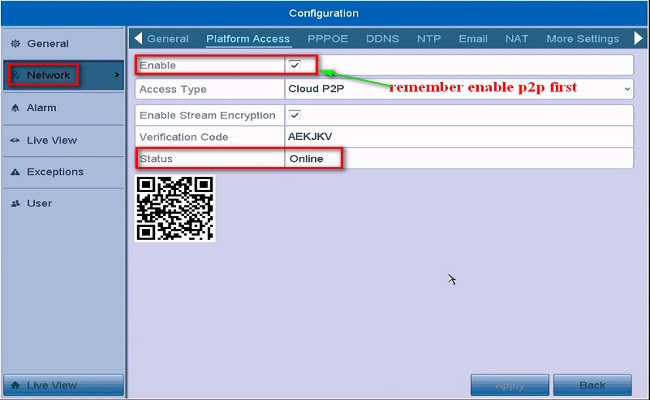
Purpose: To remotely access the DVR/NVR system on the phone APP or computer software, the cloud network status of the DVR/NVR system must be…
Here in this post, we are going to give you the complete Hikvision Mobile Setup process. It is given here for users who want to view Hikvision…
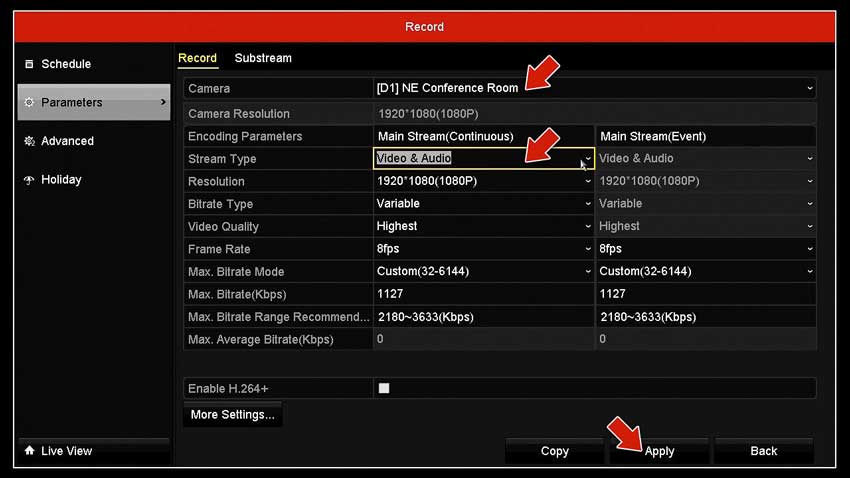
Complete CCTV Microphone Tutorial Hooking up microphones to your DVR or IP camera gives you an additional level of surveillance. Not only can you…
Your DVR may have boot failure issue if any of the following happens: LEDs are OFF at the top or front of the DVR….

Video Loss Troubleshooting for DVRs NVRs This is a basic setup guide that you need to double check if in case your cameras are…

Preparation 1. PoE NVR, IP camera 2. Memory card, waterproof tape, HDD, HDMI cable, Network cables, Monitor. a) What can I do when NVR…

What to Do If P2P Status Shows Offline? Purpose: If you want to remotely access the Annke system via phone app or computer software, the…

Updating your Wyze Cam firmware version When your Wyze Cam has a firmware update, you’ll be prompted to update in the Wyze app. But…

Security cameras are not always perfect. They can break and malfunction at different points. However, if your security camera shows a pink image, you…

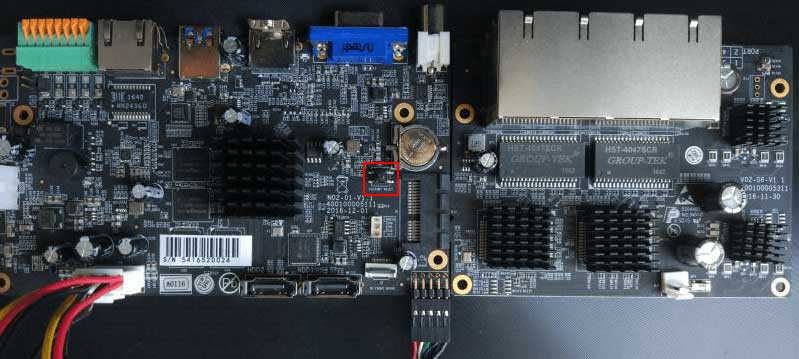
If you forgot your NVR password, you may refer to the following two methods to reset your password. Method 1. Reset the Password by…
