İçeriğe atla
Gündemdekiler
4 November 2026: Essential Security System Maintenance Steps for Maximum Protection
4 November 2026: How to Choose Between Professional Monitoring and Self Monitoring
4 November 2026: How to Set Up a DIY Home Security System Without Paying Monthly Fees
4 November 2026: The Hidden Security Camera Features You Are Not Using
4 November 2026: Simple Fixes for Common Home Alarm System False Alarms
DVRAID.Com
  • Home
  • DVR
    • DVR Firmware
    • DVR General
  • NVR
    • NVR Firmware
    • NVR General
  • IPC-WIFI General
  • General Blog
    Alt Kategoriler
    • •Home Alarm System33
    • •Technology News20
    • •Support
    Öne Çıkan Hikâyeler Tümünü Gör: General Blog →
    Default Usernames, Passwords and IP Addresses for Security Cameras
    5 dk okuma
    Default Usernames, Passwords and IP Addresses for...
    17 January 2021
    The best smart home devices for 2021
    7 dk okuma
    The best smart home devices for 2021
    10 January 2021
    Home Automation The Complete Guide
    18 dk okuma
    Home Automation The Complete Guide
    26 December 2020
TR / EN
Abone Ol
Reklam
DVRAID.Com
  • Home
  • DVR
    • DVR Firmware
    • DVR General
  • NVR
    • NVR Firmware
    • NVR General
  • IPC-WIFI General
  • General Blog
    • Home Alarm System
    • Technology News
    • Support
Dil:
TR / EN
Koyu Modu Değiştir:
Abone Ol

Ne aramak istiyorsunuz?

Aramak için yazın...

Öne Çıkan Konular
Guide How To NVR Firmware DVR Firmware IPC-WIFI General DVR General Software NVR General
Ana Sayfa / Guide / Night Owl Password Reset Instructions
GuideHow To
2 dk okuma

Night Owl Password Reset Instructions

M.Salih ASLAN M.Salih ASLAN • 5 April 2022 • 0 Yorumlar ve Tartışma
Night Owl Password Reset Instructions
Yapay Zekâ

Yapay Zekâ İçerik Özeti

Night Owl Password Reset Don’t remember the password for your Night Owl Protect device? Follow the simple instructions below to quickly and securely reset your device password without having to contact support.

Önemli Satır Başları
  • 1

    Detaylı analiz ve önemli çıkarımlar bu bölümde yer almaktadır.

Night Owl Password Reset Don’t remember the password for your Night Owl Protect device? Follow the simple instructions below to quickly and securely reset your device password without having to contact support.
Option 1 – Reset Your Password from the App Ensure the DVR / NVR is powered on and connected to the Internet so it can receive the new password once you change it.

If you forgot your device password and are logged into the DVR / NVR with your Night Owl Protect account credentials, you can easily reset your password from the app. To do so:

  1. Open the Night Owl Protect App on your Smart Device.
  2. Tap “Forgot your password?” on the Sign In screen.
  3. Retrieve the temporary code sent to the email address registered to your Night Owl Protect Account.
  4. Enter the temporary code.
  5. Create a new password and verify it.
  6. Tap “Save Password.”
  7. You can now log into your DVR / NVR with the updated password.

Watch the Short Video Tutorial Below

Reklam


Option 2 – Reset Your Password Using Our Secure Web Portal

If you do NOT have your DVR / NVR connected to the Internet and do NOT wish to use the app, you can use our secure password reset portal. To do so:

  1. Click “Forgot password” on the DVR / NVR Login screen.
  2. Go to NightOwlSP.com/NOProtect
  3. Create an account or log in.
  4. Register your device if you have not already done so.
  5. Click on “View Details.”
  6. On the Device Details page, click on “Reset Code.”
  7. Follow the provided instructions to reset your password.

Night Owl X App – Password Reset Instructions


Reklam
tags: #device password #dvr #DVR factory default password #DVR password #DVR password generator #DVR password reset #dvr password tool #Forgot Password #Instructions #mail #Master password #nvr #password #password reset #password tools #Power #reset code #Update #video
Bu yazıyı paylaş
M.Salih ASLAN
Yazar Hakkında

M.Salih ASLAN

Owner and Founder dvraid.com and dvrdestek.com

← Önceki Yazı Top 25 Free CCTV Camera Software
Sonraki Yazı → How to Open NVR Fisheye Dewarping

İlgili Yazılar

How to Choose Between Professional Monitoring and Self Monitoring
How To
15 dk okuma
M.Salih ASLAN • 4 November 2026

How to Choose Between Professional Monitoring and Self Monitoring

How to Choose Between Professional Monitoring and Self Monitoring Designing a robust physical security system requires resolving a fundamental architecture decision: How should security…

Devamını Oku
How to Set Up a DIY Home Security System Without Paying Monthly Fees
How To
12 dk okuma
M.Salih ASLAN • 4 November 2026

How to Set Up a DIY Home Security System Without Paying Monthly Fees

How to Set Up a DIY Home Security System Without Paying Monthly Fees The modern consumer smart home market is plagued by subscription fatigue….

Devamını Oku

Bir Yorum Yapın Cancel reply

Your email address will not be published. Required fields are marked *

Bu site istenmeyenleri azaltmak için Akismet kullanır. Yorum verilerinizin nasıl işlendiğini öğrenin.

Öne Çıkan Konular

V4.02.R11 H.264 / H.265 DVR / NVR Firmware Download 01
DVR Firmware
10 dk okuma

V4.02.R11 H.264 H.265 DVR NVR Firmware Download

29 August 2024
500px configwiki 02
DVR Firmware
2 dk okuma

All DAHUA Firmware Download

23 April 2020
hvrp6spro 810x456 1 03
DVR Firmware
4 dk okuma

p6scloud p6spro fimrware software tools

24 April 2020
PTZ IR27 2 04
DVR General
4 dk okuma

What is Speed ​​Dome Camera (PTZ) How to Control

23 April 2020

ADS

Kategoriler

  • Guide 370
  • How To 336
  • NVR Firmware 108
  • DVR Firmware 101
  • IPC-WIFI General 90
  • DVR General 71
  • Software 65
  • NVR General 50

Son Yorumlar

Essential Security System Maintenance Steps for Maximum Protection - DVRAID.Com
Essential Security System Maintenance Steps for Maximum Protection - DVRAID.Com konusunda: How to Reset DVR and...

“[…] 📌 İlginizi Çekebilir: How to Reset DVR and NVR Passwords: Complete...”

3 days önce
How to Choose Between Professional Monitoring and Self Monitoring - DVRAID.Com
How to Choose Between Professional Monitoring and Self Monitoring - DVRAID.Com konusunda: The Best Hidden Cameras in...

“[…] 📌 İlginizi Çekebilir: The Best Hidden Cameras in 2025 […]”

3 days önce
The Hidden Security Camera Features You Are Not Using - DVRAID.Com
The Hidden Security Camera Features You Are Not Using - DVRAID.Com konusunda: Apple Home + SONOFF Devices...

“[…] camera feeds and event triggers into Apple’s Home app alongside custom...”

3 days önce
How to Set Up a DIY Home Security System Without Paying Monthly Fees - DVRAID.Com
How to Set Up a DIY Home Security System Without Paying Monthly Fees - DVRAID.Com konusunda: Hikvision DVR and Analog System...

“[…] 📌 İlginizi Çekebilir: Hikvision DVR and Analog System User Manual 2026...”

3 days önce
Sadece ilham, sıfır spam ✨

Bültenimize Abone Olun

En iyi hikâyeleri, görüşleri ve son trendleri doğrudan e-postanıza alın.

DVRAID.Com

Survelliance DVR Information support and help site

Kategoriler

  • Best Lists
  • DVR Firmware
  • DVR General
  • General Blog
  • Guide

Özellikler

  • Ana Sayfa
  • Abone Ol
© 2026 DVRAID.Com. Tüm Hakları Saklıdır.
TR / EN
SIRADAKİ İÇERİK %98 ilgi uyumu
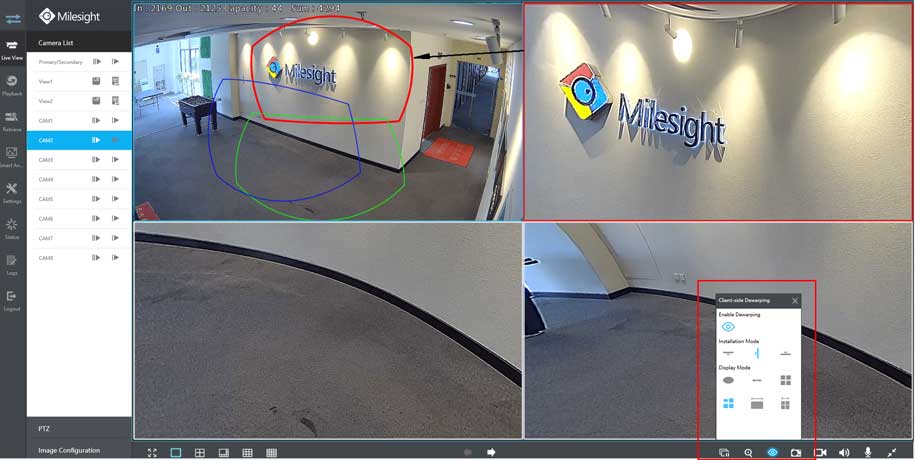
How to Open NVR Fisheye Dewarping

How to Open NVR Fisheye Dewarping

5 April 2022
Ayrılmadan önce göz atın: How to Open NVR Fisheye Dewarping
🍪

Web sitemizde size en iyi deneyimi sunabilmek, kişiselleştirilmiş içerik sağlamak ve site trafiğini analiz etmek için çerezler kullanmaktayız. Gizlilik Politikası