Advertisement
2 min read

How to upgrade XM Devices

M.Salih ASLAN M.Salih ASLAN • • 1 Discussion
1495865323538067690
AI Powered

AI Content Summary

Local upgrade operation method 1. Put the download program into the U disk, and insert the U disk into the recorder It is best to put only one program to avoid conflicts 2.

Key Moments & Highlights
  • 1
    Strategic Vision & Disruption

    Foundational principles driving emerging methodologies and trends.

  • 2
    Efficiency & Practical Application

    Real-world hurdles explored with actionable optimization techniques.

  • 3
    Looking Ahead: Future Outlook

    What to anticipate in the next phase of development and impact.

Local upgrade operation method

1. Put the download program into the U disk, and insert the U disk into the recorder

It is best to put only one program to avoid conflicts

Advertisement

2. Find the system upgrade function on the recorder

    Click order: main menu –> management tools –> system upgrade

Main menu.jpg—> Main menu interface.jpg—>Management tool interface.jpg

3. Select the file point to upgrade

System upgrade.jpg

Where to upgrade the default, no need to modify, wait for the prompt to upgrade successfully 

Upgrade tool upgrade

Instructions

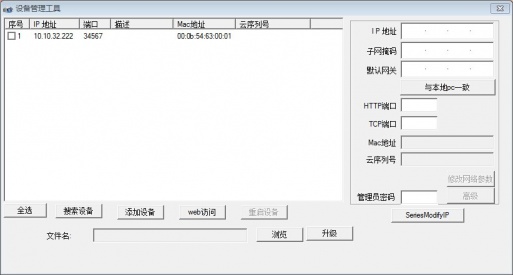
  1. Double click to open the tool Upgrade tool.jpg, click to search IP address

Upgrade tool search.jpg

2. Select the device, click Browse to select the program, and click Upgrade

Upgrade tool upgrade.jpg

3. Wait for the prompt that the upgrade is successful, do not power off during the upgrade process

Note: If the upgrade fails, possible reasons for the device and computer IP network segments or program does not match with the device model

Cms upgrade

CMS upgrade must be a device added by IP address

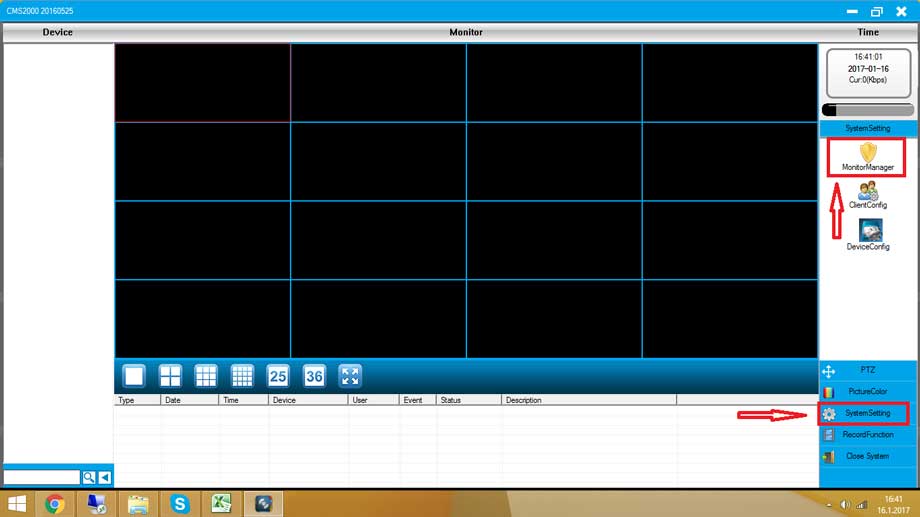
  1. Right-click on the preview screen and select device configuration

CMS right click.jpg

2. Select the management tool icon in the device configuration and select system upgrade

CMS management tool.jpg

3. Click Browse to select the program, click Upgrade, wait for the prompt to upgrade successfully, do not power off during this period

CMS system upgrade.jpg

Note: If the upgrade fails, please confirm  whether the computer and the monitoring device are on the same network segment   or   whether the program model corresponds to the device

Advertisement
Share this story
M.Salih ASLAN
About the Author

M.Salih ASLAN

Owner and Founder dvraid.com and dvrdestek.com

1 Comment

  1. Please can these cellular cameras be useful for country like Nigeria where we don’t use network carrier like Verizon?

Leave a Reply

Your email address will not be published. Required fields are marked *

This site uses Akismet to reduce spam. Learn how your comment data is processed.

Pure inspiration, zero spam ✨

Subscribe to our Newsletter

Get the finest stories, perspectives, and trends delivered straight to your inbox.

UP NEXT 98% relevance match
cms 2000 1
Before you go: CMS 2000 Computer Monitoring And Installation