
Password Reset from the LTS Patinum NVR/DVR
UI 4.0 – Reset Login Password with Security Code How to reset login password with Security Code 1. on login screen, click forget…
Start typing to search...
UI 4.0 – Reset Login Password with Security Code How to reset login password with Security Code 1. on login screen, click forget…
Wireless security cameras have become a more popular security asset for home and business surveillance over the past few years. Many users are turning to…

In this guide, I’m going to show to how to setup and configure Blue Iris on a Windows Server 2019 computer. Blue Iris is…

Contents 1 How to boot? 2 How to restore the factory settings? 3 The camera is in abnormal condition? 4 Cannot add camera for the first time? 5 No…

Contents 1 How to operate the CloudEdge App 1.1 Register account 1.2 Add the camera 1.3 Add the camera by Scan QR Code 1.4 Add the camera by AP…

J5 2K smart doorbell is a slim and compact design smart doorbell equipped with a 2K security camera. In addition to seeing the video…

UPDATING FIRMWARE Hikvision Hilook Firmware regularly updates the firmware in our products to resolve potential issues and keep your system running smoothly. Below, you…
Updating firmware The user may initiate a firmware update on a supported ONVIF device via the Management Client. A right click on a hardware…

Latest Amcrest Firmware All Model Browse all firmware. Note: After a firmware update, it is recommended to Restore to Default Settings on the device….

1. Introduction NVR Fisheye Dewarping converts the Fisheye view to a different display mode, that is, to expand a 360°panoramic view into a regular…

Description This page is to assist with integration of Dahua Video Intercom products with DSS Express The example device information listed above each Step…
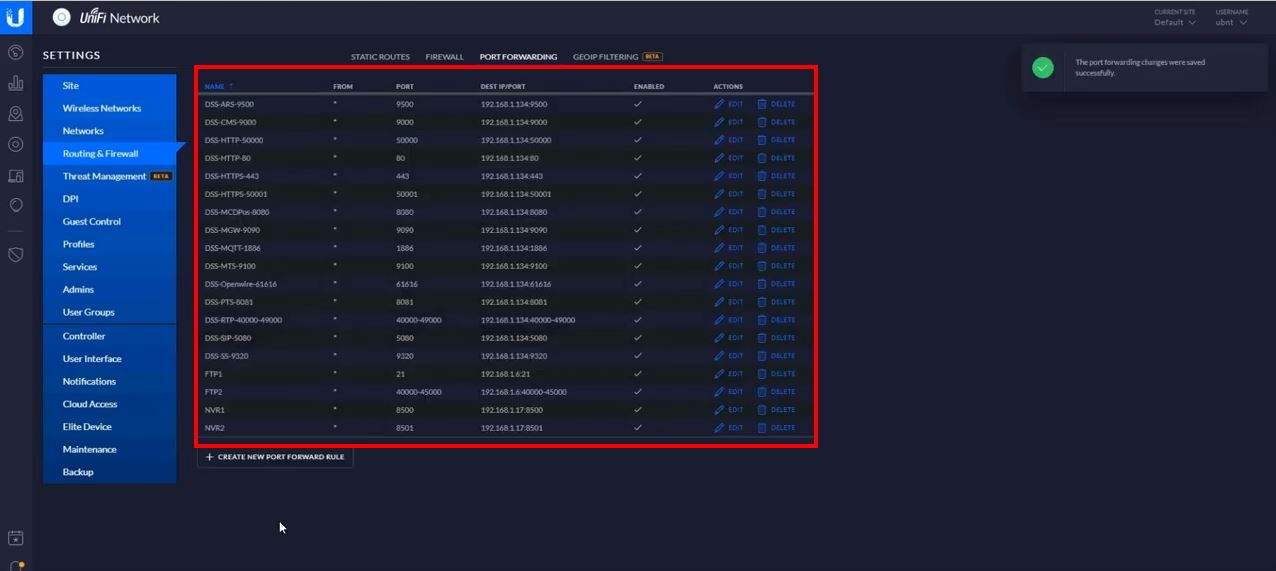
Description These instructions will show you how to setup your DSS Express server and network so you can remotely access the DSS Express server…