Reklam

MeritLiLin Camera Firmware Download Update Guide

liln camera firmwares
Yapay Zekâ

Yapay Zekâ İçerik Özeti

The first step to updating your camera firmware is to download the correct firmware for your camera. This can be done from the following locations: http://LILIN.uk/files http://meritlilin.com Once you have downloaded the correct file you will need to extract the downloaded .zip file.

Önemli Satır Başları
  • 1
    Stratejik Vizyon & Dönüşüm

    Gelişen trendlerin ve yenilikçi yaklaşımların temel prensipleri.

  • 2
    Verimlilik ve Uygulama

    Pratikte karşılaşılan zorluklar ve optimize edilmiş çözüm yolları.

  • 3
    Geleceğe Dair Öngörüler

    Önümüzdeki dönemde sektörde ve günlük hayatta yaratacağı etkiler.

The first step to updating your camera firmware is to download the correct firmware for your camera. This can be done from the following locations:

http://LILIN.uk/files

http://meritlilin.com

Reklam

Once you have downloaded the correct file you will need to extract the downloaded .zip file.

The next step is to log in to your camera with a web browser.

Once logged in to the camera, follow the steps below:

1) Click ‘Setup’ in the top right hand side.

2) Select the Maintenance tab from the top menu bar.

3) Select ‘Choose file’ and locate and select the .bin file previously extracted from the downloaded zip file.

4) Click ‘Submit’.

Your camera will start the firmware update process. The upload bar will populate with the file upload progress and once complete the screen will change to an onscreen countdown timer.
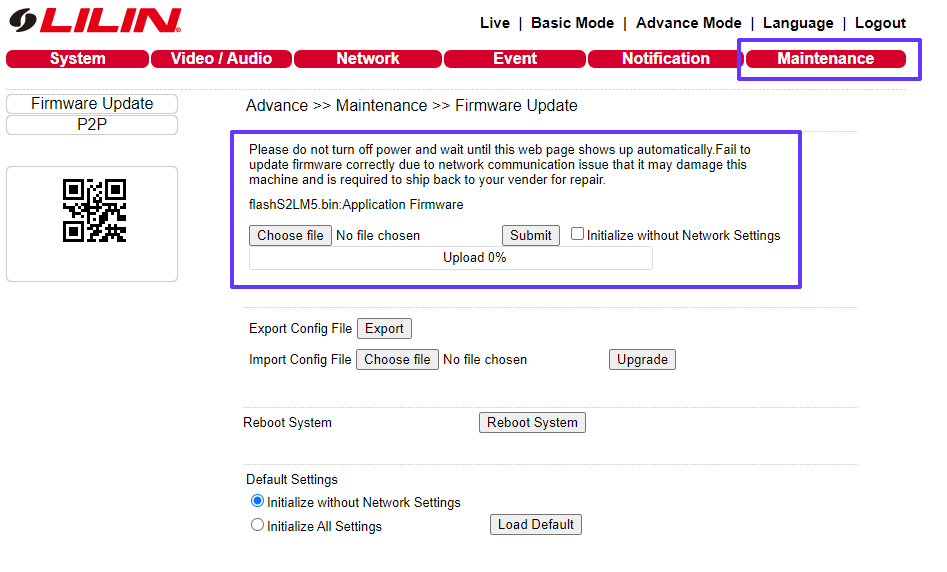
camera-firmware-update.jpg

Once the timer has finished your browser should automatically log back in to the camera.

Your firmware update is complete.


***Additional Notes***

To check your firmware has been successful, once you are logged back in to the camera, select ‘Setup’ once again and check the firmware version on the page that is displayed as shown below:
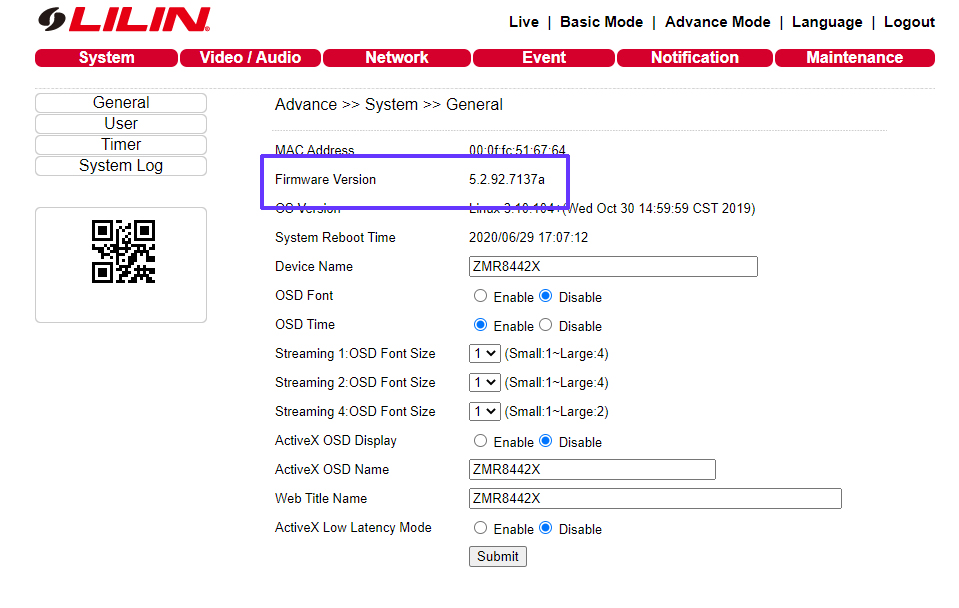
camera-current-firmware.jpg


Reklam
Bu yazıyı paylaş
M.Salih ASLAN
Yazar Hakkında

M.Salih ASLAN

Owner and Founder dvraid.com and dvrdestek.com

Bir Yorum Yapın

Your email address will not be published. Required fields are marked *

Bu site istenmeyenleri azaltmak için Akismet kullanır. Yorum verilerinizin nasıl işlendiğini öğrenin.

Sadece ilham, sıfır spam ✨

Bültenimize Abone Olun

En iyi hikâyeleri, görüşleri ve son trendleri doğrudan e-postanıza alın.

SIRADAKİ İÇERİK %98 ilgi uyumu
tkh secu
Ayrılmadan önce göz atın: TKH Security Firmware Software Download