Advertisement

MeritLiLin Camera Firmware Download Update Guide

M.Salih ASLAN M.Salih ASLAN • • 0 Discussion
liln camera firmwares
AI Powered

AI Content Summary

The first step to updating your camera firmware is to download the correct firmware for your camera. This can be done from the following locations: http://LILIN.uk/files http://meritlilin.com Once you have downloaded the correct file you will need to extract the downloaded .zip file.

Key Moments & Highlights
  • 1
    Strategic Vision & Disruption

    Foundational principles driving emerging methodologies and trends.

  • 2
    Efficiency & Practical Application

    Real-world hurdles explored with actionable optimization techniques.

  • 3
    Looking Ahead: Future Outlook

    What to anticipate in the next phase of development and impact.

The first step to updating your camera firmware is to download the correct firmware for your camera. This can be done from the following locations:

http://LILIN.uk/files

http://meritlilin.com

Advertisement

Once you have downloaded the correct file you will need to extract the downloaded .zip file.

The next step is to log in to your camera with a web browser.

Once logged in to the camera, follow the steps below:

1) Click ‘Setup’ in the top right hand side.

2) Select the Maintenance tab from the top menu bar.

3) Select ‘Choose file’ and locate and select the .bin file previously extracted from the downloaded zip file.

4) Click ‘Submit’.

Your camera will start the firmware update process. The upload bar will populate with the file upload progress and once complete the screen will change to an onscreen countdown timer.
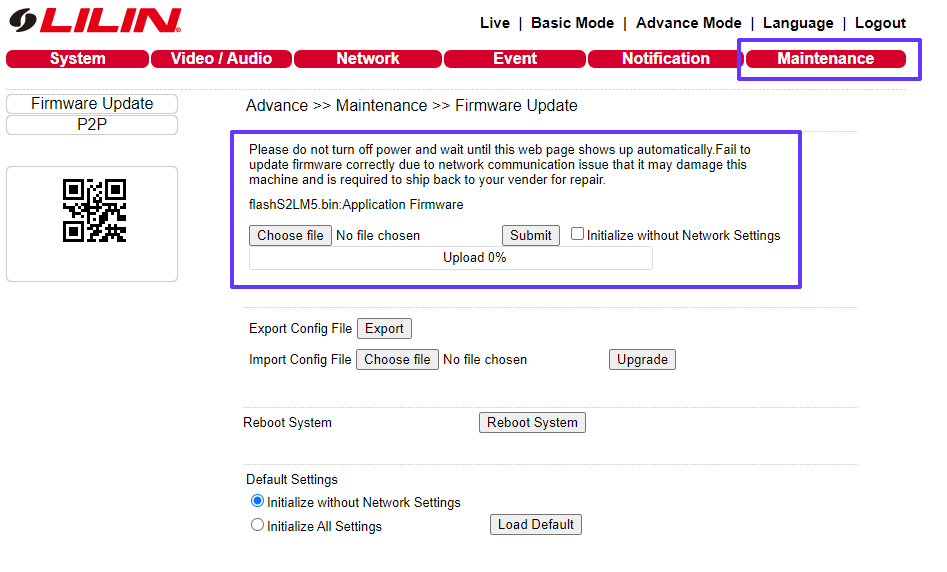
camera-firmware-update.jpg

Once the timer has finished your browser should automatically log back in to the camera.

Your firmware update is complete.


***Additional Notes***

To check your firmware has been successful, once you are logged back in to the camera, select ‘Setup’ once again and check the firmware version on the page that is displayed as shown below:
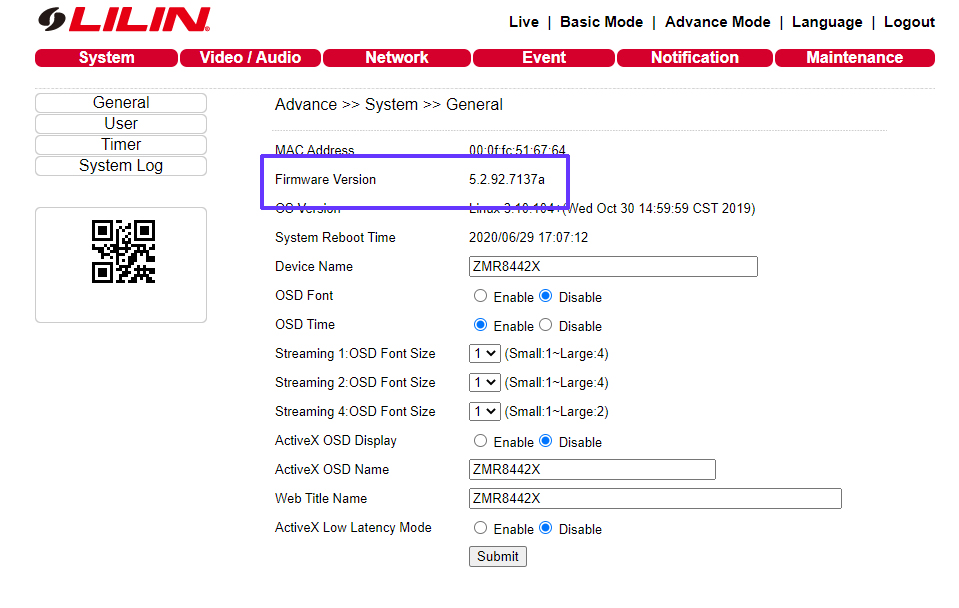
camera-current-firmware.jpg


Advertisement
Share this story
M.Salih ASLAN
About the Author

M.Salih ASLAN

Owner and Founder dvraid.com and dvrdestek.com

Leave a Reply

Your email address will not be published. Required fields are marked *

This site uses Akismet to reduce spam. Learn how your comment data is processed.

Pure inspiration, zero spam ✨

Subscribe to our Newsletter

Get the finest stories, perspectives, and trends delivered straight to your inbox.

UP NEXT 98% relevance match
tkh secu
Before you go: TKH Security Firmware Software Download