The Video Doorbell Pro integrates seamlessly with your SimpliSafe® system, allowing you to see visitors and interact with them through its live streaming and two-way audio features, without needing to be home.
If you are subscribed to either our Pro Premium Monitoring or Self Monitoring with Camera Recordings plans, the Video Doorbell Pro will record video when motion is detected, and those recordings will be stored in your account for 30 days. These recordings can be downloaded from the SimpliSafe® Mobile App or Web App.
The Video Doorbell Pro detects motion using advanced motion analytics during the day to recognise cars, people, and other objects. At night, the Video Doorbell Pro uses passive infrared (PIR) to detect moving, heat-generating objects in contrast to the environment. Since it is looking for warmer objects, you may see an uptick of motion events from the Video Doorbell Pro during the colder months.
Looking to purchase a Video Doorbell Pro? You can find it available for purchase on our website.
Video Doorbell Pro Requirements
Before installing your Video Doorbell Pro, it’s important to know that the device requires:
Failure to meet these requirements may result in damage to your device and/or your home. If you’re unsure if your system meets these requirements, we recommend contacting a licensed electrician.
You can test the voltage of your doorbell using a multimeter or voltage tester. If you’re unsure of how to do this, please consult with a licensed electrician in your area for further assistance.
Before Getting Started
You will need to have a 2.4GHz network connection available to complete the setup of this camera.
What’s in the box:
You’ll also need to have your own Phillips Head screwdriver to complete the installation.
Watch the video below for a hands-on experience from our team of experts for the installation process.
OhmKat Installation Guide
Overview
OhmKat is a 3rd party supplier of Built in Transformer Power Supplies and Wireless Digital Chimes to support the SimpliSafe Video Doorbell pro.
The OhmKat Power Supply provides a DIY installation alternative, ensuring the Video Doorbell Pro is accessible to all SimpliSafe customers. It is simply a case of plugging in the power supply to a nearby outlet, and doesn’t require a certified electrician to install.
Customers can chose to add the wireless digital chime that simply slots into the power supply set up. The OhmKat Wireless Chime has a choice of 37 different tones/melodies.
OhmKat products do not work in conjunction with any existing hard wired setup.
You can purchase this product online or through one of our expert sales agents.
Installation
Setting up the OhmKat Power Supply:
Setting up the Wireless Chime & Receiver:
Pairing additional Wireless Chimes:
You can pair up to 10 chimes to a single transmitter.
OhmKat Power Supply Troubleshooting
All OhmKats feature a patented OTPT (One Touch Power Test) technology that allows you to self test them for their full operational capability.
Troubleshooting
Chime Connector Installation Guide
The Chime Connector is a useful part of the Video Doorbell Pro’s setup. It helps to prevent the Video Doorbell Pro from producing a constant buzzing sound, or from not sounding at all when its button is pressed. All Video Doorbells sold in the UK will have this sent with the product, however, If it becomes lost or is missing please contact our Support team and they will send one to you free of charge.
Video Doorbell Pro Requirements
To ensure that your Video Doorbell Pro works as intended, it’s also important to make sure that its setup aligns with its requirements. The Video Doorbell Pro and Chime Connector require:
Installing the Chime Connector
You can install your Chime Connector by taking the following steps:
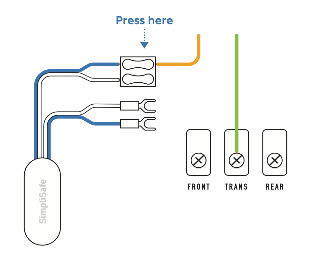
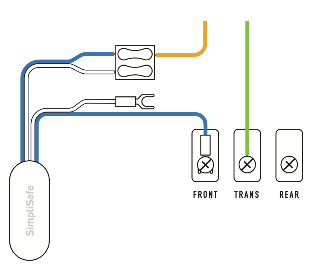
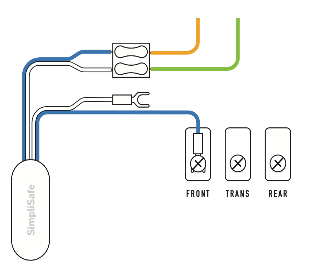
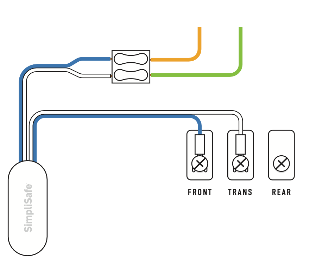
.
Recording Behavior for the Video Doorbell Pro
The Video Doorbell Pro alerts you when someone’s at the door, even if they don’t ring the bell. With a 162 degree super wide field of view, you can see everything that’s happening day or night in perfectly crisp 1080p HD.
Using Video Doorbell Pro With a SimpliSafe® System
When you add Video Doorbell Pro to a SimpliSafe® Gen 3 Home Security System with a monitoring plan you unlock its full potential. The Video Doorbell Pro will record the during the following events:
Using Video Doorbell Pro Without a SimpliSafe® System
Without a SimpliSafe® Gen 3 Home Security System, the Video Doorbell Pro will only record the following events when subscribed to a camera only plan:
Without a monitoring subscription, you’ll still receive push notifications alerting you that someone is at the door, but won’t have access to recordings – only livestreams.
Gen 3 SimpliSafe® Overview
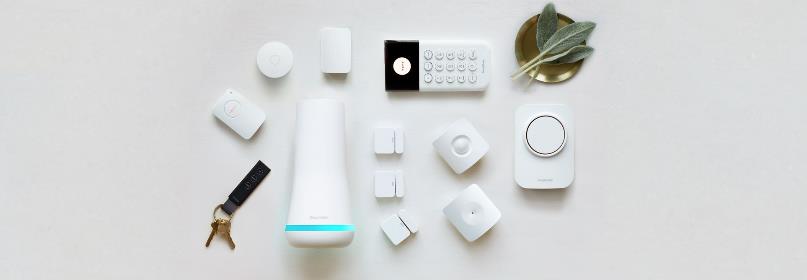
A powerful home security system built for the unexpected
The Gen 3 SimpliSafe® system is our upgraded DIY security system and the only system sold in the UK, with features added to provide homeowners peace of mind. This third-generation of our security system is Wi-Fi compatible, has more than double the components of the Original SimpliSafe® system, and its revamped design makes it easier to blend in with your home. We are constantly providing updates to ensure your system is always prepared to protect your home.
With a cellular connection* to our monitoring centre and 24-hour backup batteries, our latest system ensures you’re always protected, even if you lose power. You can also connect your system to Wi-Fi as a second communication channel. This Wi-Fi connection will allow you to manually update your Base Station and Keypad when updates are available.
*Cellular backup connection is only available with a professional monitoring subscription.
24/7 Professional Monitoring
We strongly recommend that you subscribe to professional monitoring. To learn more about the monitoring plans we offer, visit the What are the service plan options? article. SimpliSafe® has many monitoring centres around the UK that are open 24 hours a day, 365 days a year, so you can be confident whether you are at work or going to sleep that your home is protected. With Pro Premium Monitoring, you can choose to be notified immediately via email, text message, and smartphone push notifications for any events your system detects.
Still uncertain about professional monitoring? Check out thebenefits of having a monitoring plan to ensure your home is as protected as possible. If you have not activated your system, we list out the steps in the article How do I Activate Monitoring?
A Range of Settings to Personalise Your System
You can change your system-wide and device settings through the SimpliSafe® Mobile App and Keypad’s menu. Settings range from the type and frequency of notifications you receive, siren volume, device sensitivity, and more!
To learn more about updating your system’s settings, see our article Base Station and System Settings. For more on updating device settings, visit the Device and Sensor Settings article.
Once installed, you can use your Keypad to test your system. After your system has been tested, you will be able to subscribe to professional monitoring.
To troubleshoot your system, you can use the search bar at the top of this page. If you are unable to find your answer, please contact our Support team for additional help!
.